Download
1 / 12
250 likes | 725 Vues
Join Lasse and Vincent in their exciting journey to create a Bluetooth-controlled RC car! Our project focuses on using an Arduino Nano and Bluetooth module to control the car from our phones. We incorporated features like LED indicators for turning and braking, a controllable buzzer, and integrated sensors for light, temperature, and humidity. Follow our detailed steps from sourcing materials, wiring connections on a breadboard, to coding the Arduino. Although we faced challenges, including troubleshooting and hardware selection, our determination kept us on track!

E N D
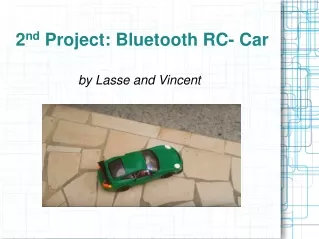
2nd Project: Bluetooth RC- Car by Lasse and Vincent
Our goals • being able to control the RC car from our phones • letting the LED's shine when the car turns/breaks • controlling the buzzer from the app • making all the sensors work
1st step: finding an Instructable • Arduino Bluetooth RC Car by MegaDAS
2nd step: materials list • PCB • 5V Buzzer • Light sensor • Arduino Nano • Bluetooth Module • Header connectors • 4- and 2- pin LED's • Motor driver H-bridge • Any RC car toy chassis • Temperature- and Humidity sensor
3rd step: ordering the materials we need • sent our project proposal to Brilliant Labs with the materials highlighted that we needed received all materials bit by bit with no problems
4th step: start connecting the different components • Connected Arduino, Bluetooth Module, Motor Drivers Bridge, Light-, Temperature- and Humidity sensors, Buzzer and LED's on a Breadboard
5th step: coding the Arduino • Copied the code from the Instructable lots of errors in the code
added libraries to the code • deleted errors out of the code code finally worked
6th step: connecting the RC Car to the Breadboard • took the RC car apart • removed everything except for the engine • connected steering wheel and engine wires to Breadboard
7th step: connecting the Android App to the Bluetooth Module • 1st time: - phone connected with no problems - LED's worked - buzzer worked (could not be controlled by the app) reconnected wires on the Breadboard
2nd time: - phone did not even connect • 3rd time: - phone connected to the Bluetooth Module and Arduino - buzzer can be controlled by the app but: RC car still unable to drive and LED's cannot be controlled by the app reconnected wires a second time
Troubleshooting • ordered the wrong car • Light intensity-, Temperature- and Humidity sensors • time made progresses but could not finish the project