Understanding Raster Graphics: Formats, Features, and Uses
Raster graphics, also known as bitmap graphics, are composed of grids of tiny dots called pixels. They have a fixed resolution, meaning they cannot be resized without losing quality. Common raster formats include GIF, JPEG, BMP, PNG, and TIFF, each with unique features. GIF supports animation and transparency, JPEG excels in color depth but lacks transparency, BMP is uncompressed and less suited for online use, while PNG allows for transparency with lossless compression. TIFF is ideal for high-resolution printing and storage. Learn about each format's applications and characteristics.

Understanding Raster Graphics: Formats, Features, and Uses
E N D
Presentation Transcript
Raster Graphics 2.01 Investigate graphic image design.
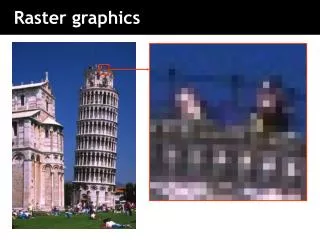
Raster Graphics • Also called bitmap graphics • Consist of grids of tiny dots called pixels • Have a fixed resolution and cannot be resized without altering image quality • Edited in paint programs Notice the pixels Bitmap enlargement Image source: http://graphicssoft.about.com/od/aboutgraphics/a/bitmapvector.htm
Common Raster Formats • GIF • JPEG • BMP • PNG • TIFF
GIF – Graphics Interchange Format • Animation – Standard format for animation on the Internet. • Transparency – yes • Lossless compression • Colors = 256 (8-bit) • Most common format for: • Text • Clip art, animations, icons, logos • Simple diagrams, line drawings • Graphics with large blocks of a single color • Graphics with transparent areas • Images displayed on computer screens and on websites. AnimatedGif
JPEG – Joint Photographic Experts Group • Animation – No • Transparency – No • Lossy compression • Colors – 16.7 M (24-bit) • High quality but larger file size than a GIF • Commonly Used For: • Desktop publishing photographs • Photographs and natural artwork • Scanned photographs • Emailing photographs • Digital camera photographs
BMP - Bitmap • Animation – No • Transparency – No • Uncompressed • 256 colors • Large file size - not well suited for transfer across the Internet or for print publications • Commonly Used For: • Editing raster graphics • Creating icons and wallpaper • On-screen display Icons
PNG – Portable Network Graphics • Animation – no • Transparency – yes • Lossless compression • 256 colors • Not suited for photographs • Biggest Disadvantage: Not widely supported by web browsers and image viewers/editors without plug-ins. • Commonly Used For: • Replacing GIF and TIFF images • Online viewing of images • See examples at http://graphicssoft.about.com/od/freedownloads/l/blfreepng07.htm
TIFF – Tagged Image File Format • Available in compressed and un-compressed formats • Compressed is advised • Commonly Used For: • Storage container for faxes and other digital images • To store raw bitmap data by some programs and devices such as scanners • High resolution printing • Desktop Publishing images