Optimization of Re-Matched Injector in MAD with Space Charge Effects and Corrected Fringe Fields
This document discusses the methodology employed for re-matching the injector using MAD and GPT, integrating space charge considerations and correcting fringe fields and magnetic lengths. The modifications to the INJ-QUAD components to ensure compatibility with space charge are detailed, alongside the optimization process conducted on Beta functions using both GPT and MAD decks. The horizontal trajectory of the injector bunch length and the impact of these corrections are analyzed, with a focus on overcoming limitations presented by the AR1-DIP-01 component.
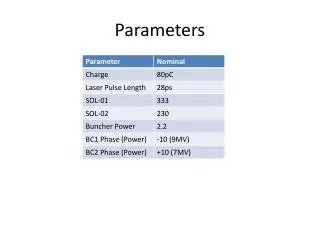

Optimization of Re-Matched Injector in MAD with Space Charge Effects and Corrected Fringe Fields
E N D
Presentation Transcript
Re-Matched Injector • Re-matched injector twiss (from GPT) in MAD using BM MAD deck • Corrected fringe fields and magnetic Length • Space Charge ON! Beta-Y Beta-X
Re-Matched Injector Bunch Length Horizontal Trajectory (Showing corrected fringe fields)
Re-Matched Injector in GPT • Modified INJ-QUAD-01/02/03/04 to match with space-charge in GPT • Optimise on (Betx|GPT - Betx|MAD)2
Re-Matched Post-Linac • Took post-linac twiss and re-matched in MAD using BM deck • Corrected fringe-fields etc • Can’t get past AR1-DIP-01…