
Sorting and Merging
E N D
Presentation Transcript
Chapter 14 Sorting and Merging
Chapter Objectives • To familiarize you with • How files may be sorted • How to process file during SORT procedure • Before it is sorted • After it is sorted • How to merge files
Chapter Contents • SORT Feature • Processing Data Before and/or After Sorting • MERGE Statement
SORT Statement • Sort then sequential batch processing performed • Sorting • You could use a sort utility separate from COBOL program • Use COBOL's SORT verb in program • Write your own
SORT Statement Simplified Format SORT file-name-1 ON ASCENDING KEY data-name-1 … DESCENDING USING file-name-2 GIVING file-name-3
ASCENDING, DESCENDING Key • To specify sequence for key field • ASCENDING: From lowest to highest • DESCENDING: From highest to lowest • Sort key fields may be numeric or nonnumeric • Alphanumeric fields sorted according to collating sequence (ASCII or EBCDIC) used by computer • Actually looks at the ASCII or EBCDIC value for sorting
Multiple Sort Keys • Can sequence records with more than one key field • Sort payroll file in ascending alphabetic sequence by name, within each level, for each office • Office number - major sort field • Level number - intermediate sort field • Name - minor sort field
Multiple Sort Keys • For Office 1, desired sequence is Office-No Level-No Name 1 1 ADAMS, J. R. 1 1 BROCK, P. T. 1 1 LEE, S. 1 2 ARTHUR, Q. C. 1 2 SHAH, J. 1 3 RAMIREZ, A. P. Easy you all know this
SORT Statement with multiple keys • Sorts records into ascending name sequence within level within office Sort Sort-File On Ascending Key Office-No On Ascending Key Level-No On Ascending Key Name Using Payroll-File-In Giving Sort-Payroll-File-Out
Condensed Multiple Sort Keys • Choose either ASCENDING or DESCENDING sequence for each key • If all key fields to be sorted in same sequence, can condense coding Sort Sort-File On Ascending Key Major-Key Intermediate-Key Minor-Key ... Example
Duplicate Key Values • Assume records to be sorted in descending order by salary • If both 9th and 24th records in input file have salary of 30000, which appears first in sort file? • Can specify that records with same value for key field be placed in sort file in same order that they appear in original input file
Duplicate Key Example Sort Sort-File On Descending Key Srt-Salary With Duplicates In Order Using Unsorted-File-In Giving Sorted-File-Out • DUPLICATES clause ensures that 9th record appears before 24th in Sort-File if both have same Salary value • I believe without this its “Unpredictable”
Files Used in SORT • Input file: File of unsorted input records • Work or sort file: File used to store records temporarily during sorting process • Output file: File of sorted output records
Files Used in SORT • Use 3 files • All defined using standard SELECT … ASSIGN entries • All must have same record format • All are opened and closed automatically by SORT
Files Used in SORT • Input and output file described with FD entries • Sort work file • Described with SD entry (Sort Descriptor) • Temporary file used only during sorting but not saved • Sort key fields must be described as part of sort record format
Sample FILE SECTION Data Division. File Section. FD Unsorted-File-In. 01 Unsorted-Rec-In. 05 Name-In Pic X(20). 05 Salary-In Pic 9(6).
Sample FILE SECTION SD Sort-File. 01 Sort-Rec. 05 Srt-Name Pic X(20). 05 Srt-Salary Pic 9(6). FD Sorted-File-Out. 01 Sorted-Rec-Out. 05 Name-Out Pic X(20). 05 Salary-Out Pic 9(6).
Operations Performed by SORT • Opens all three files • Moves all records from Unsorted-File-In to Sort-File • Sorts records in Sort-File in descending sequence by Srt-Salary • Moves all records from Sort-File to Unsorted-File-Out • Closes all three files
INPUT PROCEDURE • Use in place of USING clause to process data from input file prior to sorting • For example only records with Salary-In < 75000 may need to be sorted • Use Input Procedure to process and select desired records before sorting
SORT with INPUT PROCEDURE Sort Sort-File On Descending Key Srt-Salary Input Procedure Select-Records Giving Sorted-File-Out • Select-Records is name of paragraph written by programmer to process records before sorting
INPUT PROCEDURE Select-Records paragraph must • Open input file (Unsorted-File-In) • Perform processing of input records until there is no more data • Close input file
Processing Input Records • For each input record, if Salary-In < 75000 • Move input data to sort record • RELEASE record to sort file • When INPUT PROCEDURE paragraph is completed, control returns to SORT
RELEASE Statement RELEASE sort-record-name-1 [FROM identifier-1] • To write a record to the sort file • Like WRITE but used to output sort records • Example p. 623 Format
INPUT PROCEDURE May be used to • Validate data in input records • Process only records that meet certain criteria • Eliminate records with blank fields • Remove unneeded fields from input records • Count input records
OUTPUT PROCEDURE • With GIVING option, records in sort file automatically written to output file after sorting • Use OUTPUT PROCEDURE to process sorted records prior to, or instead of, placing them in output file • Ex. Page 629/630
SORT Statement Format SORT file-name-1 ON ASCENDING KEY data-name-1 … … DESCENDING INPUTPROCEDURE IS procedure-name-1 USING file-name-2 … OUTPUTPROCEDURE IS procedure-name-3 GIVING file-name-3 …
SORT PROCEDURES • If INPUT PROCEDURE used • SORT transfers control to paragraph or section named in INPUT PROCEDURE • When complete, sort file is sorted • If OUTPUT PROCEDURE used • SORT transfers control to paragraph or section named in OUTPUT PROCEDURE • Processes all sorted records in sort file and handles transfer of records to output file • Why do this instead of a separate procedure? • Saves Opening, Reading, Closing operation
SORT PROCEDURES • In INPUT PROCEDURE, records RELEASEd to sort file • In OUTPUT PROCEDURE, records RETURNed from sort file
RETURN Statement Format RETURN sort-file-name-1 AT END imperative statement-1 [ NOT AT END imperative statement-2] [END-RETURN] • To retrieve records from the sort file • Similar to READ • Use RETURN to access the records (doesn’t make sense)
OUTPUT PROCEDURE Steps Paragraph (or section) must • Open output file • Perform paragraph to RETURN and process records from sort file until there is no more data • Close output file • When OUTPUT PROCEDURE finished, control returns to SORT
Processing Sorted Records After records sorted but before they are created as output • Perform any operations on sort records • MOVE sort record to output area • WRITE each sort record to output file
SORT Procedures • Both INPUT and OUTPUT PROCEDUREs can be used in same program • If used, programmer must open/close the input or output file • SD (sort descriptor) file and files specified with USING or GIVING are automatically opened and closed
When to use PROCEDUREs • More efficient to use INPUT PROCEDURE if many records in input file can be eliminated before sort • Use OUTPUT PROCEDURE if records require further processing after sort • Must use procedure if input or output file and sorted file have different-sized fields or fields in different order
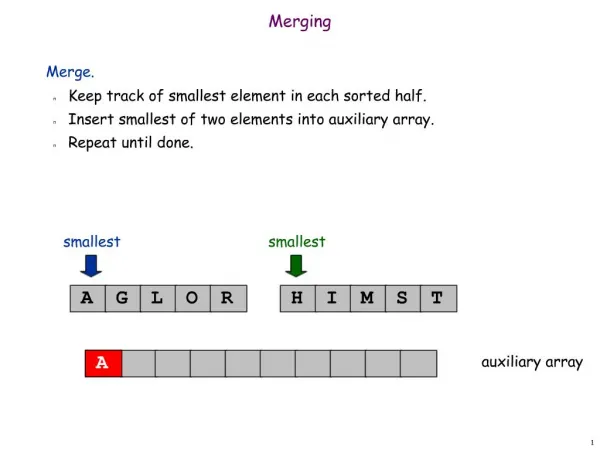
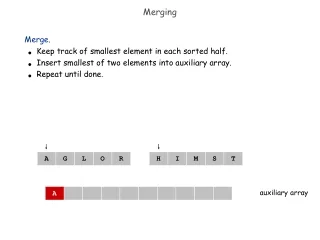
MERGE Statement • To combine two or more files into one • Files to be merged must each be in sequence by key field • So you may need to sort first • Format similar to SORT, rules for clauses are same
MERGE Statement Format MERGE file-name-1 ON ASCENDING KEY data-name-1 … … DESCENDING USING file-name-2 file-name-3 … OUTPUTPROCEDURE IS procedure-name-1 GIVING file-name-4 … • To combine two or more files into one
MERGE Statement • File-name-1 is work file designated as an SD • Keys specified are defined within SD • Data-name-1 is major key, may be followed by intermediate and minor keys • USING clause names file to be merged • At least two must be included
MERGE Statement • Records may be processed after merging with OUTPUT PROCEDURE, but not before • Automatically handles opening, closing, and input/output associated with files
MERGE Statement Example • Suppose two separate files of employees are to be combined into one • Both input files and the resulting output file contain 80 characters with an Emp-No in the first nine positions • File definitions and MERGE instruction follow
MERGE Statement Example Data Division. File Section. FD Emp-File-1. 01 Emp-Rec-1 Pic X(80). FD Emp-File-2. 01 Emp-Rec-2 Pic X(80).
MERGE Statement Example SD Merge-File. • 01 Merge-Rec. • 05 Mrg-Emp-No Pic X(9). • 05 Rest-of-Rec Pic X(71). FD Out-Emp-File. 01 Out-Emp-Rec Pic X(80).
MERGE Statement Example Procedure Division. 100-Main-Module. Merge Merge-File On Ascending Key Mrg-Emp-No Using Emp-File-1, Emp-File-2 Giving Out-Emp-File Stop Run.
Chapter Summary • SORT used for sorting records in either ascending or descending order • SORT uses work or sort file described with an SD • Key fields to be sorted are data-names defined within SD or sort file • Files may be sorted using more than one key field
Chapter Summary • Routines separate from SORT may be used to • Process unsorted file prior to SORT • Process sorted file after SORT • Procedures that are part of SORT permit processing • Just before sort performed (INPUT PROCEDURE) • After sort finished but before writing records to sorted file (OUTPUT PROCEDURE)
Chapter Summary • RELEASE statement used in INPUT PROCEDURE to make input records available for sorting • RETURN statement used in OUTPUT PROCEDURE to read records from sort file • Think of it as a READ statement
Chapter Summary • MERGE statement used to merge two or more files into one