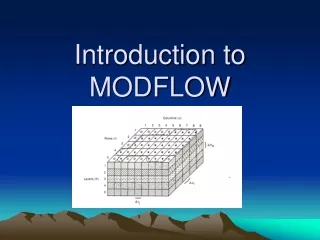
MODFLOW Data Model
The MODFLOW data model integrates hydrological simulations with ArcGIS, offering a comprehensive framework for storing, archiving, and analyzing groundwater models. It enables users to import externally built models, create new MODFLOW models, and develop custom geoprocessing tools for enhanced model analysis. The model features layers representing various geological formations, enabling effective visualization and editing. With tools for input/output management, discretization, and workflow development, users can streamline groundwater modeling processes. Explore more at the provided resources.

MODFLOW Data Model
E N D
Presentation Transcript
MODFLOW Data Model An extension of the Arc Hydro Groundwater Simulation feature dataset
MODFLOW Data Model • Data standard for storing MODFLOW models in a GIS database • Importing models built externally • Archiving calibrated models • Building new MODFLOW models inside ArcGIS • Custom scripts for analyzing/modifying models can be developed as geoprocessing tools
Boundary Polygon J I
Cell2D and Node2D Features Cell2D Node2D
Riverbank Model Layer 1 • Consists of sands, silts, and clays from floodplain and alluvial deposits • Superjacent ancestral stream channels cut across this formation creating lateral channels of gravels and unconsolidated sediments
Turlock Lake Laguna Formation Model Layers 3,4 and 5 • Predominantly consists of sands, silts, and clays • Superjacent ancestral stream channels cut across this formation, creating lateral channels of gravels and unconsolidated sediments
Mehrten Formation Model Layers 6,7 and 8 • Composed of two dominant units: • Black andesitic sands “salt and pepper sand” and blue and brown clays • Hard gray and black tuff-breccias “lava”
Valley Springs Formation Model Layer 9 • Consists of rhyolite ash, quartz sand , and ashy clay
Ione Formation Model Layer 10 • Consists of sandstone, silts, and clays
MODFLOW Analyst Tools • Developed as geoprocessing (GP) tools • Classes of tools • Import • Export • Visualization/Map Layers • Model editing • Building package input • Working with transient input/solutions
Import MODFLOW Model Tool INPUT OUTPUT
Make MODFLOW Features Tool + Or Node2D Cell2D INPUT OUTPUT
Build Package Input • Discretize: • Spatial • Polygons K zones (overlay) • Points K values (interpolate) • Polylines River cells • Points Wells • Temporal • Time Series Stress Periods
Geoprocessing Tools - Workflows • GP tools enable the development of workflows as models or scripts • Extendable – You can create your own workflows • Leverage low-level tools to create new tools
For more information http://www.archydrogw.com (AHGW Wiki page) http://www.aquaveo.com/archydro (Info on tools) Norm Jones njones@byu.edu 801-422-7569 Jeff Davis jdavis@aquaveo.com 801-835-7445