Serial Communication and Initialization for GPS Data Transmission
10 likes | 133 Vues
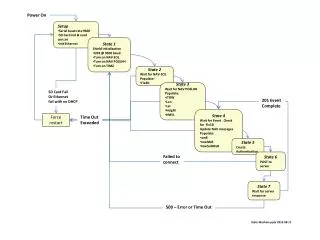
This document outlines the procedure for initializing a GPS module with a baud rate of 9600. It includes steps to set up the SD card, read configuration files, and establish a network connection via Ethernet. The state machine logic is detailed, ensuring proper transitions through different states while awaiting navigation solutions and position updates. Error handling is also addressed, including scenarios for failure to connect and timeouts. This guide serves as a comprehensive resource for developers working with GPS data transmission over serial and network connections.


Serial Communication and Initialization for GPS Data Transmission
E N D
Presentation Transcript
Power On • Setup • Serial baud rate 9600 • SD Card init & read cert.ini • Init Ethernet • State 1 • Shield Initialization • UBX @ 9600 baud • Turn on NAV SOL • Turn on NAV POSLHH • Turn on TIM2 • State 2 • Wait for NAV-SOL • Populate: • Fix3D • State 3 • Wait for NAV POSLHH • Populate: • iTOW • Lon • Lat • Height • hMSL SD Card Fail Or Ethernet fail with no DHCP 201 Event Complete • State 4 • Wait for Event . Check for Fix3D • Update NAV messages • Populate: • wnR • towMsR • towSubMsR Time Out Exceeded Force restart State 5 Create Authentication Failed to connect State 6 POST to server State 7 Wait for server response 500 – Error or Time Out State Machine pptx2013-08-17