Comprehensive Online Ad Specifications for Effective Campaigns
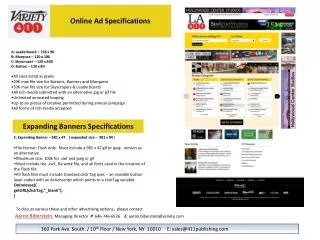
Discover the detailed online advertising specifications to enhance your digital campaigns. This guide includes formats like Leaderboard (728x90), Marquee (120x180), Skyscraper (120x600), and Button (120x80), along with their respective file size limits. Learn about rich media requirements, including unlimited animated looping and the need for alternative jpg or gif files. Key details for Expanding Banners (981x47 expanded to 981x94) are also provided, emphasizing the importance of including all necessary files and click tracking tags. For more information or inquiries, contact Aaron Biberstein at 646-746-6526 or via email at aaron.biberstein@variety.com.

Comprehensive Online Ad Specifications for Effective Campaigns
E N D
Presentation Transcript
Online Ad Specifications • A: Leaderboard – 728 x 90 • B: Marquee – 120 x 180 • C: Skyscraper – 120 x 600 • D: Button – 120 x 80 • All sizes listed as pixels • 20K max file size for Buttons, Banners and Marquees • 50K max file size for Skyscrapers & Leaderboards • All rich media submitted with an alternative jpg or gif file • Unlimited animated looping • Up to six pieces of creative permitted during annual campaign • All forms of rich media accepted Expanding Banners Specifications • E: Expanding Banner – 981 x 47 ( expanded size – 981 x 94 ) • File format: Flash only. Must include a 981 x 47 gif or jpeg version as an alternative. • Maximum size: 100k for .swf and jpeg or gif • Must include the .swf, .fla work file, and all fonts used in the creation of the Flash file. • All flash files must include standard click Tag spec – an invisible button layer coded with an Actionscript which points to a clickTag variable: • On(release){ • getURL(clickTag,”_blank”); A • ) To discuss various these and other advertising options, please contact Aaron Biberstein, Managing Director P: 646-746-6526E: aaron.biberstein@variety.com 360 Park Ave. South. / 10th Floor / New York, NY 10010 E: sales@411publishing.com