Download
1 / 3
30 likes | 159 Vues
This guide outlines the steps to connect a PHP application running on an IIS web server to various SQL data sources using Open Database Connectivity (ODBC) on a Windows Server. It includes registering a Data Source Name (DSN) in the Server Control Panel, which associates a name with the target database and its corresponding ODBC driver. By following these instructions, developers can effectively integrate their web applications with diverse data sources, benefiting from Microsoft's middleware solution for seamless connectivity.

E N D
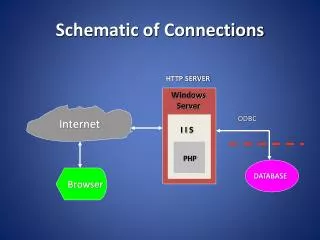
Schematic of Connections HTTP SERVER Windows Server ODBC Internet I I S PHP Browser DATABASE
ODBC – Open Data Base Connectivity Microsoft’s middleware for connecting applications to a variety of SQL Data Sources with provided drivers. At the Control Panel of the Server – Register a Data Source Name (DSN) by associating a name with a path to a target database and the appropriate driver.
Example of an ODBC Application Example of an ODBC application Example of an ODBC application PHP/ Web Server Browser