IF Function
This guide explores the IF function in spreadsheet applications, providing clear examples of how to make decisions based on given conditions. It covers simple, complex, and nested IF scenarios, such as calculating tuition based on credit hours and determining bonus amounts based on job codes. It also discusses tax rates based on income brackets and how utility charges are structured based on consumption levels. With links to additional resources for tuition calculations and utility charges, this guide serves as a useful tool for efficiently managing spreadsheet formulas.

IF Function
E N D
Presentation Transcript
IF Function Decision: Action based on condition
Examples • SF State Tuition calculation: • http://www.sfsu.edu/~bulletin/current/fee.htm • Simple condition • PG&E electric charges: • http://www.pge.com/myhome/myaccount/charges/ • More than one condition
Examples • Simple condition: • If total sales exceeds $300 then applies 5% discount; otherwise, no discount. • More than one condition: • Taxable Income < =3000 no tax • 3000 < taxable income <= 10000 5% tax • Taxable income > 10000 15% tax • Complex condition: • If an applicant’s GPA > 3.0 and SAT > 1200: admitted
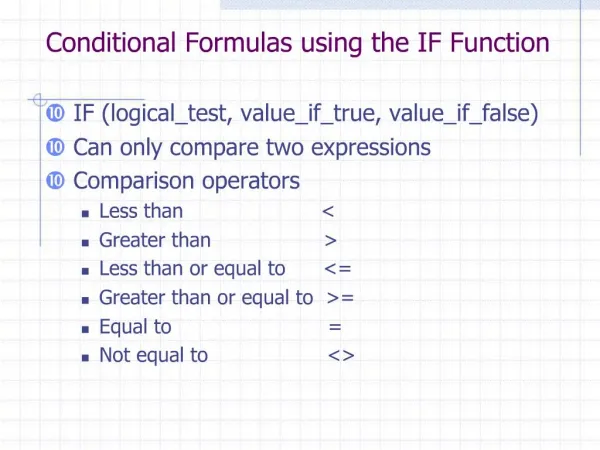
Comparison • Less than: < • Less than or equal: <= • Greater than: > • Greater than or equal: >= • Equal: = • Not equal: <> • At least: >= • At most: <= • No more than: <= • No less than: >= • A comparison returns True/False.
IF Function • =IF(condition, ValueIfTrue,ValueIfFalse) • Example: • Tuition: If total units <= 12, then tuition = 1200 • Otherwise, tuition = 1200 + 200 per additional unit • In Cell C2: IF(B2<=12, 1200, 1200+200*(b2-12))
Example: Compute weekly wage. Overtime hours are paid 50% more than the regular pay. • In Cell D2: If(C2<=40, B2*C2, B2*40 + 1.5*B2*(C2-40))
Example: Tax rate is based on married status: • Single: 15% • Married: 10% • In D5: If(B5=“S”,$C$1*C5, $C$2*C5)
Example: A restaurant charges service fee based on this rule: 15% of the check amount with a minimum of $2.
Exercises • 1. The average of two exams is calculated by this rule: 60% * higher score + 40% * lower score. • 2. An Internet service provider offers a service plan that charges customer based on the following rules: • The first 20 hours: $10 • Each additional hour: $1.5
Nested IF • Example: • Rules to determine bonus: • JobCode = 1, Bonus=500 • JobCode = 2, Bonus = 700 • JobCode = 3, Bonus = 1000 • In C2: If(B2=1, 500, If(B2=2, 700, 1000))
1 JobCode= 1 Or <> =1 2 JobCode=2 Or <> 2 3
Example • Electric Company charges customers based on KiloWatt-Hour used. The rules are: • First 100 KH, 20 cents per KH • Each of the next 200 KH • (up to 300 KH), 25 cents per KH • All KH over 300, 30 cents per KH • In C2: If(B2<=100, .2*B2,If(B2<=300,.2*100+.25*(B2-100),.2*100+.15*200+.3*(B2-300))
What if we have more than 3 conditions • Example: Bonus • JobCode = 1, Bonus = 500 • JobCode = 2, Bonus = 600 • JobCode = 3, Bonus = 700 • JobCode = 4, Bonus = 800 • JobCode = 5, Bonus = 1000 • … • Other functions: • Table lookup
Example • State University calculates students tuition based on the following rules: • State residents: • Total units taken <=12, tuition = 1200 • Total units taken > 12, tuition = 1200 + 200 per additional unit. • Non residents: • Total units taken <= 9, tuition = 3000 • Total units taken > 9, tuition = 3000 + 500 per additional unit.
Units <= 12 or Not Resident or Not Units <= 9 or Not
Multiple Spreadsheets: How to reference a cell/range in another spreadsheet? • SpreadsheetName!Cell • Example: Reference cell C5 in a spreadsheet named Revenue: • Revenue!C5 • SpreadsheetName!Range • Example: Reference range C5:C10 in a spreadsheet named Revenue: • Revenue!C5:C10