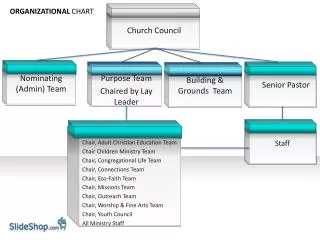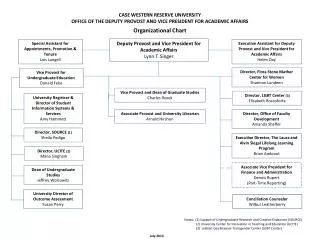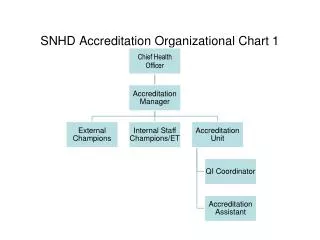
SNHD Accreditation Organizational Chart 1
20 likes | 141 Vues
Enhance your team's decision-making experience with our interactive settings for polling and scoring. This setup features a vibrant color scheme, automatic results display, and an engaging countdown timer, making every vote count. It supports multiple teams with a clear leaderboard and offers an intuitive user interface for responses. Customize your sessions with visual answers, ensuring clarity for all participants. Ideal for workshops, training sessions, or corporate conferences, this tool fosters collaboration and boosts engagement.


SNHD Accreditation Organizational Chart 1
E N D
Presentation Transcript
<?xml version="1.0"?><AllQuestions /> <?xml version="1.0"?><AllResponses /> <?xml version="1.0"?><Settings><answerBulletFormat>Numeric</answerBulletFormat><answerNowAutoInsert>No</answerNowAutoInsert><answerNowStyle>Explosion</answerNowStyle><answerNowText>Answer Now</answerNowText><chartColors>Use PowerPoint Color Scheme</chartColors><chartType>Horizontal</chartType><correctAnswerIndicator>Checkmark</correctAnswerIndicator><countdownAutoInsert>No</countdownAutoInsert><countdownSeconds>10</countdownSeconds><countdownSound>TicToc.wav</countdownSound><countdownStyle>Box</countdownStyle><gridAutoInsert>No</gridAutoInsert><gridFillStyle>Answered</gridFillStyle><gridFillColor>255,255,0</gridFillColor><gridOpacity>50%</gridOpacity><gridTextStyle>Keypad #</gridTextStyle><inputSource>Response Devices</inputSource><multipleResponseDivisor># of Responses</multipleResponseDivisor><participantsLeaderBoard>5</participantsLeaderBoard><percentageDecimalPlaces>0</percentageDecimalPlaces><responseCounterAutoInsert>No</responseCounterAutoInsert><responseCounterStyle>Oval</responseCounterStyle><responseCounterDisplayValue># of Votes Received</responseCounterDisplayValue><insertObjectUsingColor>Red</insertObjectUsingColor><showResults>Yes</showResults><teamColors>Use PowerPoint Color Scheme</teamColors><teamIdentificationType>None</teamIdentificationType><teamScoringType>Voting pads only</teamScoringType><teamScoringDecimalPlaces>1</teamScoringDecimalPlaces><teamIdentificationItem></teamIdentificationItem><teamsLeaderBoard>5</teamsLeaderBoard><teamName1></teamName1><teamName2></teamName2><teamName3></teamName3><teamName4></teamName4><teamName5></teamName5><teamName6></teamName6><teamName7></teamName7><teamName8></teamName8><teamName9></teamName9><teamName10></teamName10><showControlBar>All Slides</showControlBar><defaultCorrectPointValue>0</defaultCorrectPointValue><defaultIncorrectPointValue>0</defaultIncorrectPointValue><chartColor1>187,224,227</chartColor1><chartColor2>51,51,153</chartColor2><chartColor3>0,153,153</chartColor3><chartColor4>153,204,0</chartColor4><chartColor5>128,128,128</chartColor5><chartColor6>0,0,0</chartColor6><chartColor7>0,102,204</chartColor7><chartColor8>204,204,255</chartColor8><chartColor9>255,0,0</chartColor9><chartColor10>255,255,0</chartColor10><teamColor1>187,224,227</teamColor1><teamColor2>51,51,153</teamColor2><teamColor3>0,153,153</teamColor3><teamColor4>153,204,0</teamColor4><teamColor5>128,128,128</teamColor5><teamColor6>0,0,0</teamColor6><teamColor7>0,102,204</teamColor7><teamColor8>204,204,255</teamColor8><teamColor9>255,0,0</teamColor9><teamColor10>255,255,0</teamColor10><displayAnswerImagesDuringVote>Yes</displayAnswerImagesDuringVote><displayAnswerImagesWithResponses>Yes</displayAnswerImagesWithResponses><displayAnswerTextDuringVote>Yes</displayAnswerTextDuringVote><displayAnswerTextWithResponses>Yes</displayAnswerTextWithResponses><questionSlideID></questionSlideID><controlBarState>Expanded</controlBarState><isGridColorKnownColor>True</isGridColorKnownColor><gridColorName>Yellow</gridColorName></Settings> <?xml version="1.0"?><AllAnswers /> SNHD Accreditation Organizational Chart 1