Understanding Inquirer Roles in HRMS: Transaction Codes and Access Levels (2007)
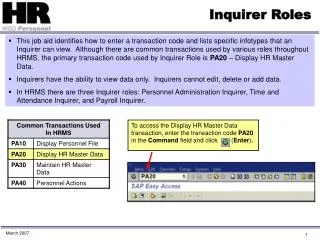
This job aid outlines how Inquirers can access transaction codes and view specific infotypes in HRMS. While Inquirers primarily use the transaction code PA20 to display HR master data, they are restricted to view-only access, meaning they cannot edit, delete, or add any data. The HRMS system categorizes Inquirers into three roles: Personnel Administration Inquirer, Time and Attendance Inquirer, and Payroll Inquirer. This guide will help users understand their capabilities and access within the HRMS framework as of March 2007.

Understanding Inquirer Roles in HRMS: Transaction Codes and Access Levels (2007)
E N D
Presentation Transcript
Inquirer Roles • This job aid identifies how to enter a transaction code and lists specific infotypes that an Inquirer can view. Although there are common transactions used by various roles throughout HRMS, the primary transaction code used by Inquirer Role is PA20 – Display HR Master Data. • Inquirers have the ability to view data only. Inquirers cannot edit, delete or add data. • In HRMS there are three Inquirer roles: Personnel Administration Inquirer, Time and Attendance Inquirer, and Payroll Inquirer. To access the Display HR Master Data transaction, enter the transaction code PA20 in the Command field and click (Enter). March 2007
Inquirer Roles March 2007