Download
1 / 52
520 likes | 646 Vues
This presentation explores the fundamental concepts of 3D modeling and the viewing pipeline, drawing from esteemed sources such as Ohio State, Minnesota, and MIT. Key topics covered include the rendering equation, geometry terms, and the properties of polygon and curved surfaces. It emphasizes the importance of modeling techniques, including procedural and interactive methods, and discusses common operations like extrusion, revolution, and constructive solid geometry (CSG). Enhance your understanding of transformations, visibility, and the organization of spaces within the graphics pipeline.

E N D
Modeling and The Viewing Pipeline Jian Huang CS594 The material in this set of slides have referenced slides from Ohio State, Minnesota and MIT.
The Rendering Equation • I(x,x’) = intensity passing from x’ to x • g(x,x’) = geometry term (1, or 1/r2, if x visible from x’, 0 otherwise) • e(x,x’) = intensity emitted from x’ in the direction of x • r(x,x’,x’’) = scattering term for x’ (fraction of intensity arriving at x’ from the direction of x’’ scattered in the direction of x) • S = union of all surfaces
Modeling • Types: • Polygon surfaces • Curved surfaces • Generating models: • Interactive • Procedural
Polygon Mesh • Set of surface polygons that enclose an object interior, polygon mesh • De facto: triangles, triangle mesh.
Representing Polygon Mesh • Vertex coordinates list, polygon table and (maybe) edge table • Auxiliary: • Per vertex normal • Neighborhood information, arranged with regard to vertices and edges
Arriving at a Mesh • Use patches model as implicit or parametric surfaces • Beziér Patches : control polyhedron with 16 points and the resulting bicubic patch:
Example: The Utah Teapot • 32 patches single shaded patch wireframe of the control points Patch edges
Patch Representation vs. Polygon Mesh • Polygons are simple and flexible building block. • But, a parametric representation has advantages: • Conciseness • A parametric representation is exact and analytical. • Deformation and shape change • Deformations appear smooth, which is not generally the case with a polygonal object.
Common Polyhedral Shape Construction Operations • Extrude: add a height to a flat polygon • Revolve: Rotate a polygon around a certain axis • Sweep: sweep a shape along a certain curve (a generalization of the above two) • Loft: shape from contours (usually in parallel slices) • Set operations (intersection, union, difference), CSG (constructive solid geometry) • Rounding operations: round a sharp corner
Constructive Solid Geometry (CSG) • To combine the volumes occupied by overlapping 3D shapes using set operations. intersection difference union
F P P Pinhole Model • Visibility Cone with apex at observer • Reduce hole to a point - the cone becomes a ray • Pin hole - focal point, eye point or center of projection.
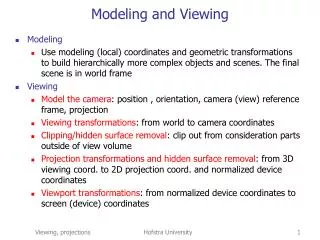
Filling Algorithms - Flood Fill • flood_fill (x, y, old_color, new_color, connectivity) • if read_pixel(x, y) = old_color then • draw_pixel(x, y, new_color); • recursive_call(x, y, old_color, new_color, connectivity); • end_if; EYE OBJECT WORLD Transformations – Need ? • Modeling transformations • build complex models by positioning simple components • Viewing transformations • placing virtual camera in the world • transformation from world coordinates to eye coordinates • Side note: animation:vary transformations over time to create motion
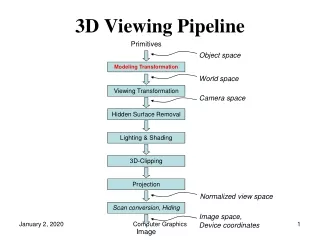
Object Space World Space Eye Space Clipping Space Screen Space Viewing Pipeline Canonical view volume • Object space: coordinate space where each component is defined • World space: all components put together into the same 3D scene via affine transformation. (camera, lighting defined in this space) • Eye space: camera at the origin, view direction coincides with the z axis. Hither and Yon planes perpendicular to the z axis • Clipping space: do clipping here. All point is in homogeneous coordinate, i.e., each point is represented by (x,y,z,w) • 3D image space (Canonical view volume): a parallelpipied shape defined by (-1:1,-1:1,0,1). Objects in this space is distorted • Screen space: x and y coordinates are screen pixel coordinates
Spaces: Example Object Space and World Space: Eye-Space:
Spaces: Example • Clip Space: • Image Space:
2D Transformation • Translation • Rotation
Homogeneous Coordinates • Matrix/Vector format for translation:
Translation in Homogenous Coordinates • There exists an inverse mapping for each function • There exists an identity mapping
Why these properties are important • when these conditions are shown for any class of functions it can be proven that such a class is closed under composition • i. e. any series of translations can be composed to a single translation.
Rotation in Homogeneous Space The two properties still apply.
Putting Translation and Rotation Together • Order matters !!
Affine Transformation • Property: preserving parallel lines • The coordinates of three corresponding points uniquely determine any Affine Transform!!
Affine Transformations T • Translation • Rotation • Scaling • Shearing
How to determine an Affine 2D Transformation? • We set up 6 linear equations in terms of our 6 unknowns. In this case, we know the 2D coordinates before and after the mapping, and we wish to solve for the 6 entries in the affine transform matrix
Affine Transformation in 3D • Translation • Rotate • Scale • Shear
More Rotation • Which axis of rotation is this?
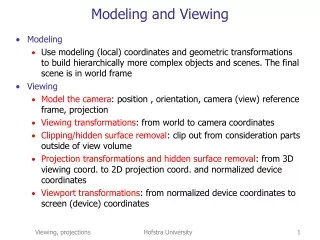
Viewing • Object space to World space: affine transformation • World space to Eye space: how? • Eye space to Clipping space involves projection and viewing frustum
Image W F I World Perspective Projection and Pin Hole Camera • Projection point sees anything on ray through pinhole F • Point W projects along the ray through F to appear at I (intersection of WF with image plane)
Image Formation Image F World Projecting shapes • project points onto image plane • lines are projected by projecting its end points only
World Image F W Image I F World Orthographic Projection • focal point at infinity • rays are parallel and orthogonal to the image plane
Simple Perspective Camera • camera looks along z-axis • focal point is the origin • image plane is parallel to xy-plane at distance d • d is call focal length for historical reason
Y [Y, Z] [(d/Z)Y, d] Z [0, 0] [0, d] Similar Triangles • Similar situation with x-coordinate • Similar Triangles: point [x,y,z] projects to [(d/z)x, (d/z)y, d]
é ù é ù d 0 0 0 x ê ú ê ú é ù 0 d 0 0 y d d ê ú ê ú [ ] = Þ dx dy dz z x y d ê ú ê ú ê ú ë û 0 0 d 0 z z z ê ú ê ú ê ú ê ú ë 0 0 1 0 û ë 1 û Divide by 4th coordinate (the “w” coordinate) Projection Matrix • Projection using homogeneous coordinates: • transform [x, y, z] to [(d/z)x, (d/z)y, d] • 2-D image point: • discard third coordinate • apply viewport transformation to obtain physical pixel coordinates
View Volume • Defines visible region of space, pyramid edges are clipping planes • Frustum :truncated pyramid with near and far clipping planes • Near (Hither) plane ? Don’t care about behind the camera • Far (Yon) plane, define field of interest, allows z to be scaled to a limited fixed-point value for z-buffering.
Difficulty • It is difficult to do clipping directly in the viewing frustum
Canonical View Volume • Normalize the viewing frustum to a cube, canonical view volume • Converts perspective frustum to orthographic frustum – perspective transformation
Perspective Transform • The equations alpha = yon/(yon-hither) beta = yon*hither/(hither - yon) s: size of window on the image plane z’ alpha 1 z yon hither
About Perspective Transform • Some properties
About Perspective Transform • Clipping can be performed against the rectilinear box • Planarity and linearity are preserved • Angles and distances are not preserved • Side effects: objects behind the observer are mapped to the front. Do we care?
Perspective + Projection Matrix • AR: aspect ratio correction, ResX/ResY • s= ResX, • Theta: half view angle, tan(theta) = s/d
Camera Control and Viewing Focal length (d), image size/shape and clipping planes included in perspective transformation • r Angle or Field of view (FOV) • AR Aspect Ratio of view-port • Hither, YonNearest and farthest vision limits (WS). Lookat - coi Lookfrom - eye View angle - FOV
Complete Perspective • Specify near and far clipping planes - transform z between znear and zfar on to a fixed range • Specify field-of-view (fov) angle • OpenGL’s glFrustum and gluPerspective do these
More Viewing Parameters • Camera, Eye or Observer: • lookfrom:location of focal point or camera • lookat: point to be centered in image • Camera orientation about the lookat-lookfromaxis • vup: a vector that is pointing straight up in the image. This is like an orientation.
Implementation … Full Blown • Translate by -lookfrom, bring focal point to origin • Rotate lookat-lookfrom to the z-axis with matrix R: • v = (lookat-lookfrom) (normalized) and z = [0,0,1] • rotation axis: a = (vxz)/|vxz| • rotation angle: cos = a•z and sin = |rxz| • OpenGL:glRotate(, ax, ay, az) • Rotate about z-axis to get vup parallel to the y-axis
Viewport mapping • Change from the image coordinate system (x,y,z) to the screen coordinate system (X,Y). • Screen coordinates are always non-negative integers. • Let (vr,vt) be the upper-right corner and (vl,vb) be the lower-left corner. • X = x * (vr-vl)/2 + (vr+vl)/2 • Y = y * (vt-vb)/2 + (vt+vb)/2