
Uploaded by
elsu
1 SLIDES
130 VUES
10LIKES
Resolving Flickering Red Rectangle Issue in MC Service Support
DESCRIPTION
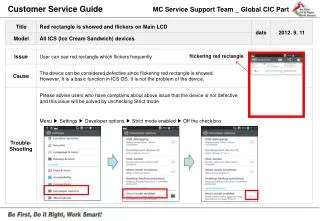
If users experience a flickering red rectangle on their device, please inform them that this is not a defect. The issue can be resolved by adjusting the developer options. To do this, navigate to Menu > Settings > Developer options > Strict mode enabled and uncheck the box. This simple adjustment will correct the display issue and enhance device performance, ensuring a better user experience.
Download
1 / 1
Download Presentation

Télécharger la présentation
Resolving Flickering Red Rectangle Issue in MC Service Support
An Image/Link below is provided (as is) to download presentation
Download Policy: Content on the Website is provided to you AS IS for your information and personal use and may not be sold / licensed / shared on other websites without getting consent from its author.
Content is provided to you AS IS for your information and personal use only.
Download presentation by click this link.
While downloading, if for some reason you are not able to download a presentation, the publisher may have deleted the file from their server.
During download, if you can't get a presentation, the file might be deleted by the publisher.
E N D
Presentation Transcript
Customer Service Guide MC Service Support Team _ Global CIC Part flickering red rectangle Please advise users who have complains about above issue that the device is not defective and this issue will be solved by unchecking Strict mode Menu ▶ Settings ▶ Developer options ▶ Strict mode enabled ▶ Off the check box




















More Related

Audio
Live Player