SQL Server 2008 Replication Configuration for Transaction Logs in Clustered Environment
30 likes | 165 Vues
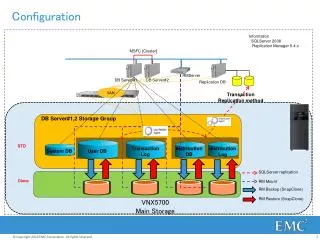
This guide provides detailed instructions on configuring SQL Server 2008 replication in a clustered environment using the Microsoft SQL Server Replication Manager. It covers transaction replication methods between DBServer#1 and DBServer#2, focusing on the distribution of transaction logs and their management through SAN storage. Learn how to set up and monitor your replication system, including the backup and restore processes using SnapClone methods for efficient data handling and recovery on VNX5700 main storage.


SQL Server 2008 Replication Configuration for Transaction Logs in Clustered Environment
E N D
Presentation Transcript
Configuration Information SQLServer 2008 Replication Manager 5.4.x MSFC [Cluster] RMServer DBServer#1 DBServer#2 Replication DB SAN Transaction Replication method DBServer#1,2 Storage Group STD distribution DB Transaction Log distribution Log System DB User DB SQLServer replication Clone RM Mount RM Backup (SnapClone) RM Restore (SnapClone) VNX5700 Main Storage