
Understanding Input Devices: Keyboards, Mice, Touch Screens, and more
E N D
Presentation Transcript
Chapter 2-03: Understanding Input Discovering Computers 2012: Chapter 5
Objectives Overview Discovering Computers 2014: Chapter 7 See Page 288 for Detailed Objectives
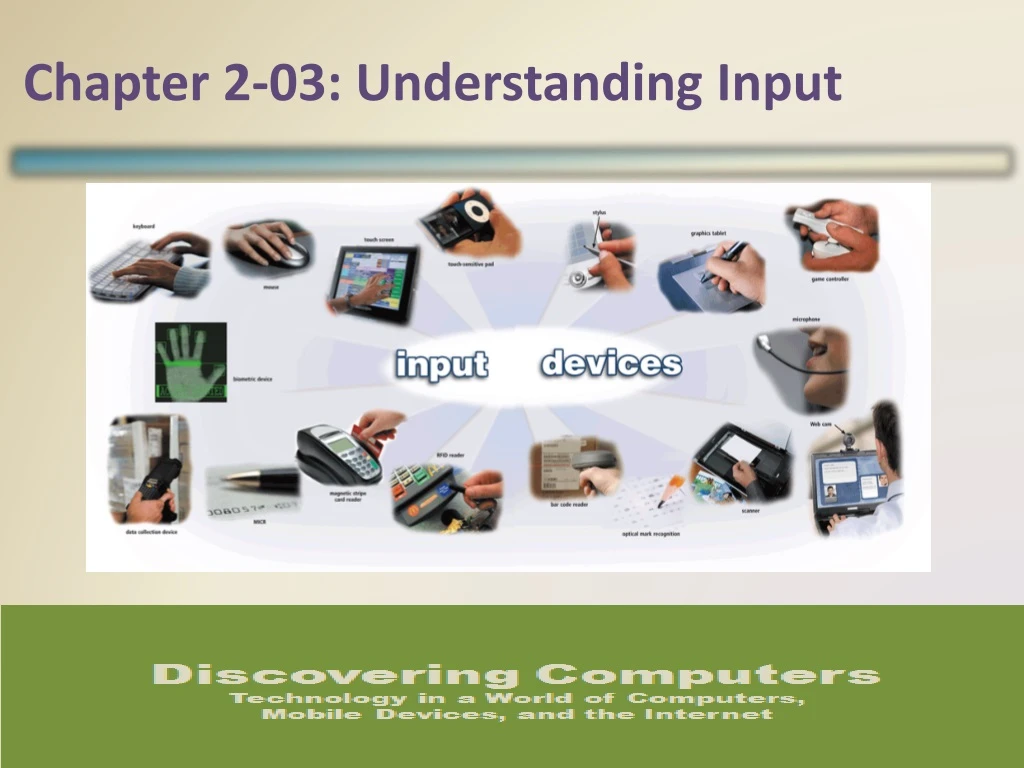
What Is Input? • Inputis any data and instructions entered into the memory of a computer Pages 288– 289 Figure 7-1 Discovering Computers 2014: Chapter 7
What Are Input Devices Discovering Computers 2014: Chapter 7 Page 260
What Is Input? • Commonly used input methods include: Discovering Computers 2014: Chapter 7 Page 288
Keyboards • A keyboardis an input device that contains keys users press to enter data and instructions into a computer or mobile device Discovering Computers 2014: Chapter 7 Page 290 Figure 7-2
Keyboards • Most desktop computer keyboards have… Discovering Computers 2014: Chapter 7 Page 290
Keyboards • There are various types of keyboards in addition to standard keyboards found on desktops Discovering Computers 2014: Chapter 7 Page 291 Figure 7-3
Keyboards • An ergonomic keyboard has a design that reduces the chance of repetitive strain injuries • Ergonomics incorporates comfort, efficiency, and safety into the design of the workplace Discovering Computers 2014: Chapter 7 Page 292 Figure 7-4
Pointing Devices Discovering Computers 2014: Chapter 7 Page 292
Pointing Devices • A mouseis a pointing device that fits under the palm of your hand comfortably • Optical mouse, laser mouse, and touch mouse Discovering Computers 2014: Chapter 7 Page 292 Figure 7-5
Pointing Devices Discovering Computers 2014: Chapter 7 Pages 293 - 294 Figures 7-6 – 7-8
Touch Screens • A touch screenis a touch-sensitive display device Discovering Computers 2014: Chapter 7 Page 294
Pen Input • With pen input, you touch a stylusor digital pen on a flat surface to write, draw, or make selections Discovering Computers 2014: Chapter 7 Page 297 Figure 7-10
Pen Input • A graphics tablet, also called a digitizer, is an electronic plastic board that detects and converts movements of a style or digital pen into signals that are sent to the computer Page 298 Figure 7-12 Discovering Computers 2014: Chapter 7
Motion Input • With motion input, sometimes called gesture recognition, users can guide on-screen elements using air gestures Discovering Computers 2014: Chapter 7 Pages 298 - 299
Voice Input • Voice input is the process of entering input by speaking into a microphone • Voice recognition, also called speech recognition, is the computer or mobile device’s capability of distinguishing spoken words (video1) Pages 299 – 300 Figure 7-13 Discovering Computers 2014: Chapter 7
Audio Input • Audio input is the process of entering any sound into the computer such as speech, music, and sound effects • Music production software allows users to record, compose, mix, and edit music and sounds Page 300 Figure 7-14 Discovering Computers 2014: Chapter 7
Video Input • Video inputis the process of capturing full-motion images and storing them on a computeror mobile device’s storage medium Discovering Computers 2014: Chapter 7 Page 300
Video Input • A webcamis a type of DV camera that enables a user to: Discovering Computers 2014: Chapter 7 Page 302
Video Input • A videoconferenceis a meeting between two or more geographically separated people Discovering Computers 2014: Chapter 7 Page 303 Figure 7-16
Scanners and Reading Devices • A scanneris a light-sensing input device that reads printed text and graphics and then translates the results into a form the computer can process • A flatbed scanner works in a manner similar to a copy machine except it creates a file of the document in memory instead of a paper copy Discovering Computers 2014: Chapter 7 Page 304
Scanners and Reading Devices Discovering Computers 2014: Chapter 7 Page 277 Figure 5-27
Scanners and Reading Devices Discovering Computers 2014: Chapter 7 Page 304 Figure 7-17
Scanners and Reading Devices • An optical reader is a device that uses a light source to read characters, marks, and codes and then converts them into digital data that a computer can process • Optical character recognition (OCR) • Optical mark recognition (OMR) Discovering Computers 2014: Chapter 7 Page 304
Scanners and Reading Devices • A bar code reader, also called a bar code scanner uses laser beams to read bar codes • A QR codestores information in both a vertical and horizontal direction Page 305 Figure 7-18 Discovering Computers 2014: Chapter 7
Scanners and Reading Devices • RFID(radio frequency identification) uses radio signals to communicate with a tag placed in or attached to an object • An RFID readerreads information on the tag via radio waves • RFID can track: Discovering Computers 2014: Chapter 7 Page 306
Scanners and Reading Devices • Magstripe readersread the magnetic stripe on the back of cards such as: Discovering Computers 2014: Chapter 7 Page 306 Figure 7-20
Scanners and Reading Devices • MICR (magnetic ink character recognition) devices read text printed with magnetized ink • An MICR reader converts MICR characters into a form the computer can process • Banking industry uses MICR for check processing Discovering Computers 2014: Chapter 7 Page 307 Figure 7-21
Scanners and Reading Devices • A data collection device obtains data directly at the location where the transaction or event takes place Discovering Computers 2014: Chapter 7 Page 307 Figure 7-22
Biometric Input • Biometrics authenticates a person’s identity by verifying a personal characteristic Discovering Computers 2014: Chapter 7 Pages 282 - 283
Biometric Input hand geometry system iris recognition system fingerprint reader Discovering Computers 2014: Chapter 7 Pages 282 – 283 Figures 5-37 – 5-39
Terminals • A terminal is a computer that allows users to send data to and/or receive information from a host computer Discovering Computers 2014: Chapter 7 Pages 284 – 285 Figures 5-40 – 5-42
Input Devices for Physically Challenged Users • Several input devices are available to assist physically challenged users: Discovering Computers 2014: Chapter 7 Page 286
Input Devices for Physically Challenged Users Keyboard with larger keys Head-mounted pointer Page 286 Figures 5-44 – 5-45 Discovering Computers 2014: Chapter 7
Summary Discovering Computers 2014: Chapter7 Page 287