
Uploaded by
jenna
4 SLIDES
184 VUES
40LIKES
Floating Tools
DESCRIPTION
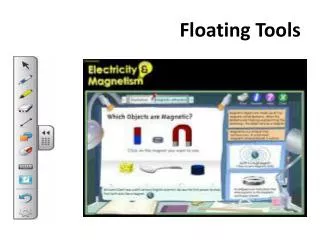
Discover the powerful features of the Floating Tools for your screen. Use Spotlight to effortlessly highlight specific areas, making it easier to focus on important content. With the Magnifier, you can enlarge any part of your screen, allowing for a more detailed view when needed. The Control Panel lets you configure a variety of software and hardware options to personalize your user experience. These tools are designed to improve accessibility and enhance your overall productivity.
Download
1 / 4
Télécharger la présentation 
Floating Tools
An Image/Link below is provided (as is) to download presentation
Download Policy: Content on the Website is provided to you AS IS for your information and personal use and may not be sold / licensed / shared on other websites without getting consent from its author.
Content is provided to you AS IS for your information and personal use only.
Download presentation by click this link.
While downloading, if for some reason you are not able to download a presentation, the publisher may have deleted the file from their server.
During download, if you can't get a presentation, the file might be deleted by the publisher.
E N D
Presentation Transcript
Spotlight Spotlight Highlight an area of your screen.
Magnifier The Magnifier Enlarge any part of your screen to show a more detailed view.
Control Panel Configure a variety of software and hardware options.






More Related