Download
1 / 2
Easy Website Publishing Guide with iWeb and Firefox FTP
20 likes | 140 Vues
Step-by-step instructions to create and update web pages using iWeb, publish to a folder, and upload to a server via Firefox FTP. Learn to manage your website seamlessly.

Télécharger la présentation 
Easy Website Publishing Guide with iWeb and Firefox FTP
An Image/Link below is provided (as is) to download presentation
Download Policy: Content on the Website is provided to you AS IS for your information and personal use and may not be sold / licensed / shared on other websites without getting consent from its author.
Content is provided to you AS IS for your information and personal use only.
Download presentation by click this link.
While downloading, if for some reason you are not able to download a presentation, the publisher may have deleted the file from their server.
During download, if you can't get a presentation, the file might be deleted by the publisher.
E N D
Presentation Transcript
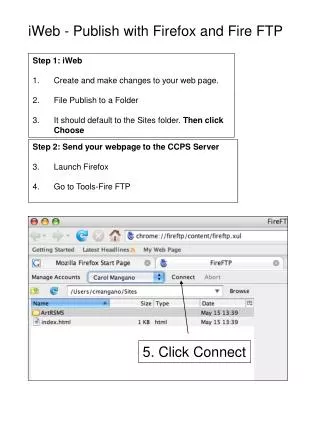
iWeb - Publish with Firefox and Fire FTP Step 1: iWeb Create and make changes to your web page. File Publish to a Folder It should default to the Sites folder. Then click Choose Step 2: Send your webpage to the CCPS Server Launch Firefox Go to Tools-Fire FTP 5. Click Connect
Right side is the CCPS web server 6. Highlight the folders and files on the left and then click the right arrow to send to the web server. If a box appears, choose Overwrite All to replace your web site. Left side is your local Sites folder


















More Related