Visualizing Scaled Confidence Intervals: Interactive Animation Controls
150 likes | 276 Vues
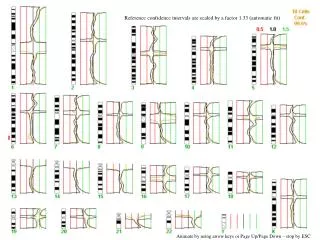
Explore the scaling effects on confidence intervals through an interactive animation. This tool allows users to visualize how different scaling factors impact the reference confidence intervals. Users can animate the adjustments using arrow keys or Page Up/Page Down for precise control, and can stop the animation any time by pressing ESC. The tool provides a range of scaling factors, from -3.0 to 3.0, allowing users to see the effect of each factor on the data visually. Engage with this dynamic representation for enhanced understanding of statistical concepts.


Visualizing Scaled Confidence Intervals: Interactive Animation Controls
E N D
Presentation Transcript
Reference confidence intervals are scaled by a factor 1.33 (automatic fit) Animate by using arrow keys or Page Up/Page Down – stop by ESC
Reference confidence intervals are scaled by a factor 3.0 Animate by using arrow keys or Page Up/Page Down – stop by ESC
Reference confidence intervals are scaled by a factor 2.5 Animate by using arrow keys or Page Up/Page Down – stop by ESC
Reference confidence intervals are scaled by a factor 2.0 Animate by using arrow keys or Page Up/Page Down – stop by ESC
Reference confidence intervals are scaled by a factor 1.5 Animate by using arrow keys or Page Up/Page Down – stop by ESC
Reference confidence intervals are scaled by a factor 1.33 (automatic fit) Animate by using arrow keys or Page Up/Page Down – stop by ESC
Reference confidence intervals are scaled by a factor 1.0 Animate by using arrow keys or Page Up/Page Down – stop by ESC
Reference confidence intervals are scaled by a factor 0.5 Animate by using arrow keys or Page Up/Page Down – stop by ESC
Reference confidence intervals are scaled by a factor 0.0 Animate by using arrow keys or Page Up/Page Down – stop by ESC
Reference confidence intervals are scaled by a factor -0.5 Animate by using arrow keys or Page Up/Page Down – stop by ESC
Reference confidence intervals are scaled by a factor -1.0 Animate by using arrow keys or Page Up/Page Down – stop by ESC
Reference confidence intervals are scaled by a factor –1.5 Animate by using arrow keys or Page Up/Page Down – stop by ESC
Reference confidence intervals are scaled by a factor –2.0 Animate by using arrow keys or Page Up/Page Down – stop by ESC
Reference confidence intervals are scaled by a factor –2.5 Animate by using arrow keys or Page Up/Page Down – stop by ESC
Reference confidence intervals are scaled by a factor -3.0 Animate by using arrow keys or Page Up/Page Down – stop by ESC