Network Storage
This guide provides an overview of fundamental storage technologies: Storage Area Networks (SAN), Network Attached Storage (NAS), and Redundant Array of Independent Disks (RAID). It explains how hard drives operate, the role of the operating system in data management, and the mechanics of different RAID levels (0, 1, 5, and 6) including their advantages and disadvantages. Additionally, the document contrasts SAN and NAS, clarifying their unique functionalities and communication protocols, offering a comprehensive understanding for individuals seeking efficient storage solutions.

Network Storage
E N D
Presentation Transcript
Network Storage SAN and NAS
SIDEBAR RAID
Hard Drive • The disk hardware: • Writes data to a specific location on the drive • On a selected platter • On a specified track • Rewriting a complete specific sector • 1’s and 0’s • Disks know nothing of files • The OS: • Keeps track of file names • File system • Maps file names • To where on the disk the 1’s and 0’s are kept for the data • File may be broken up (fragmented) • To fit available space chunks on disk • Specific part of the disk is reserved for this mapping • FAT, VFAT, FAT32, HPFS, NTFS, EXT2, EXT3, etc…
RAID • Redundant Array of Independent (Inexpensive) Disks • 2 or more drives • 1 drive • Various levels – RAID 0,1,2,3,4,5,6 • Also 10, 50, 60 • RAID function can be done via hardware or software
RAID Sidebar: Common Levels • RAID 0: Striped • 2 or more drives configured as one • Data is striped across multiple drives • Pluses: • “Larger” capacity • Speed • Can access data from multiple drives simultaneously • Minuses: • Higher Failure rate than single drive • Total data loss if one drive fails
RAID Sidebar: Common Levels • RAID 1: Mirrored • 2 or more drives configured as one • Usually 2 drives • Data copied (duplicated) on both drives • Pluses: • Lower “failure” rate • No data loss if one drive fails • Minuses: • “Wasted” drive space • e.g. 50% for a 2 drive system • Small performance impact
RAID Sidebar: Common Levels • RAID 5: Parity • 3 or more drives configured as one • Data spread across multiple drives with parity • If one drive fails, data can be rebuilt • Pluses: • “Larger” drive • Can survive one drive failure • Minuses: • More complex • Some “wasted” drive space
RAID Sidebar: Common Levels • RAID 6: Enhanced RAID 5 • 4 or more drives configured as one • Additional parity block • Pluses: • Improved data safety • Can survive 2 drive failures • Minuses: • More “wasted” space • Write penalty
RAID Sidebar: Uncommon Levels • RAID 01 • Mirror of stripes • RAID 10: Combination of 0 and 1 • Stripe of mirrors • 4 or more drives configured as one • Pluses: • Speed • Data safety • Minuses: • “Wasted” capacity
RAID Sidebar: Uncommon Levels • No common definition • RAID 50: Combination of 5 and 0 • Sometimes referred to as 5+0 • RAID 60: Combination of 6 and 0 • Sometimes referred to as 6+0
How many drive failures can Raid 6 Survive: • 0 • 1 • 2 • 3 • 4
SAN Storage Area Network http://en.wikipedia.org/wiki/Storage_area_network
Storage Area Network (SAN) • An architecture to attach (remote) computer storage devices to servers • Devices appear as locally attached to operating system • disk arrays, tape libraries, optical jukeboxes, etc. • Device may be near, but not physically in the server like local storage is • Device may be remote • Cost and complexity is dropping • SANs are still uncommon outside larger enterprises
Storage Area Network (SAN) • Works at the disk address level (block) • NAS contrasted to a SAN: • network-attached storage (NAS) • uses file-based protocols • E.g. NFS or SMB/CIFS • It is clear that the storage is remote • Computers request a portion of an abstract file rather than a disk block
SAN Network types
Network types • Most storage networks use the SCSI protocol for communication between servers and disk drive devices • Does not use the SCSI low-level physical interface (e.g. cables) • Its bus topology is unsuitable for networking
Network types • To form a network, a mapping layer is used to other low-level protocols: • Fibre Channel Protocol (FCP) • Maps SCSI over Fibre Channel • Currently the most common. • iSCSI • Maps SCSI over TCP/IP • HyperSCSI • Maps SCSI over Ethernet • FICON • Maps over Fibre Channel (used by mainframe computers) • ATA over Ethernet • Mapping ATA over Ethernet • SCSI and/or TCP/IP mapping over InfiniBand (IB)
SAN Storage sharing
Storage sharing • SAN market Driving forces: • Rapid growth of highly transactional data • Requires high speed, block-level access to hard drives • Data from email servers • Databases • High usage file servers • Historically • Enterprises created "islands" of high performance SCSI disk arrays • Each island was dedicated to a different application and visible as a number of "virtual hard drives" • LUNs (Logical Unit Numbers) • SAN essentially connected those storage islands using a high-speed network • Operating system sees a SAN as a collection of LUNs • Each maintains its own file systems on them
Storage sharing • Most reliable and most widely used are the local file systems • Cannot be shared among multiple hosts • If two independent local file systems resided on a shared LUN, they would be unaware of the fact • Have no means of cache synchronization • Eventually would corrupt each other • Sharing data between computers through a SAN requires advanced solutions • SAN file systems • Clustered computing
Storage sharing • Despite such issues, SANs help to increase storage capacity utilization • Multiple servers share the same growth reserve on disk arrays • In contrast, NAS allows many computers to access the same file system over the network and synchronizes their accesses • Lately, the introduction of NAS heads allowed easy conversion of SAN storage to NAS
SAN Benefits
Benefits • Sharing storage usually: • Simplifies storage administration • Adds flexibility • Cables and storage devices do not have to be physically moved to move storage from one server to another
Benefits • Other benefits include • Ability to allow servers to boot from the SAN itself • Allows for a quick and easy replacement of faulty servers • The SAN can be reconfigured so that a replacement server can use the LUN of the faulty server • Process can take as little as half an hour • Relatively new idea being pioneered in newer data centers • Number of emerging products designed to facilitate and speed up this process still further
Benefits • More effective disaster recovery processes • SAN can span a distant location containing a secondary storage array • Enables storage replication either implemented by • disk array controllers • server software • specialized SAN devices • IP WANs are often least costly method of long-distance transport • Fibre Channel over IP (FCIP) and iSCSI protocols have been developed to allow SAN extension over IP networks • Traditional physical SCSI layer could only support a few meters • not nearly enough to ensure business continuance in a disaster. • Demand for this SAN application has increased dramatically after the September 11th attacks in the United States, and increased regulatory requirements associated with Sarbanes-Oxley and similar legislation.
Benefits • Consolidation of disk arrays economically accelerated advancement of some of their advanced features: • I/O caching • Snapshotting • Volume cloning • Business Continuance Volumes or BCVs
SAN SAN infrastructure
SAN infrastructure • SANs often utilize a Fibre Channel fabric topology • Infrastructure specially designed to handle storage communications • Provides faster and more reliable access than higher-level protocols used in NAS • A fabric: • Similar in concept to a network segment in a local area network • A typical Fibre Channel SAN fabric is made up of a number of Fibre Channel switches.
SAN infrastructure • All major SAN equipment vendors also offer some form of Fibre Channel routing solution • Bring substantial scalability benefits to the SAN architecture • Allows data to cross between different fabrics without merging them • Use proprietary protocol elements • Top-level architectures being promoted are radically different • Often enable mapping Fibre Channel traffic over IP or over SONET/SDH
SAN Compatibility
Compatibility • Early problems with Fibre Channel SANs • Switches and other hardware from different manufacturers were not entirely compatible • Basic storage protocols FCP were standard • Some of the higher-level functions did not interoperate well. • Many host operating systems would react badly to other operating systems sharing the same fabric • Many solutions were • Pushed to the market before standards were finalized • Vendors innovated around the standards.
Compatibility • The combined efforts of the members of the Storage Networking Industry Association (SNIA) improved the situation during 2002 and 2003 • Today most vendor devices interoperate nicely • There are still many high-level functions that do not work between different manufacturers’ hardware
SAN SANs at home?
SANs at home? • SANs are primarily used in large scale, high performance enterprise storage operations • It would be unusual to find a single disk drive connected directly to a SAN. • SANs are normally networks of large disk arrays • SAN equipment is relatively expensive • Fibre Channel host bus adapters are rare in desktop computers. • The iSCSI SAN technology is expected to eventually produce cheap SANs • Unlikely that this technology will be used outside the enterprise data center environment. • Desktop clients are expected to continue using NAS protocols such as CIFS and NFS • The exception to this may be remote storage replication
SAN SANs in the Media and Entertainment
SANs in the Media and Entertainment • Video editing workgroups require very high data rates. • Outside of the enterprise market, this is one area that greatly benefits from SANs • Per-node bandwidth usage control, sometimes referred to as quality-of-service (QoS) • Especially important in video workgroups • Lets you ensure a fair and prioritized bandwidth usage across your network • Avid Unity and Tiger Technology MetaSAN are specifically designed for video networks and offer this functionality
SAN Storage virtualization and SANs
Storage virtualization and SANs • Storage virtualization • Process of completely abstracting logical storage from physical storage • The physical storage resources are aggregated into storage pools • Logical storage is created from the pool • Presents the user a logical space for data storage • Transparently handles the process of mapping it to the actual physical location • Naturally implemented inside each modern disk array • Using vendor's proprietary solution • Goal is to virtualizemultiple disk arrays into a single monolithic storage device • Made by different vendors • Scattered over the network • Can be managed uniformly
NAS Network Attached Storage http://en.wikipedia.org/wiki/Network-attached_storage
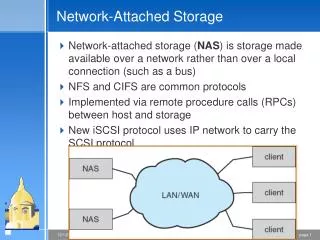
Network-attached storage (NAS) • A file-level computer data storage • Connected to a computer network • Providing data access to heterogeneous network clients
NAS Description
Description • NAS hardware is similar to the traditional file server equipped with direct attached storage (DAS) • Differs considerably on the software side • Operating system and other software on the NAS unit provides: • Data storage • Data access • Management of these functionalities • Use of NAS devices for other purposes is discouraged • Many vendors also purposely make it hard to develop or install any third-party software on their NAS device • Use closed source operating systems and protocol implementations • Basically, NAS devices are server appliances
Description • NAS units also commonly have a web interface • As opposed to monitor/keyboard/mouse • Minimal-functionality or stripped-down operating systems are used on NAS devices • E.g. FreeNAS is in fact a "leaned-out" version of FreeBSD • An open source NAS software meant to be deployed on standard computer hardware
Description • NAS systems usually contain one or more hard disks • Arranged into logical, redundant storage containers or RAIDs • Same as traditional file servers • NAS removes the responsibility of file serving from other servers on the network • NAS uses file-based protocols such as • NFS (popular on UNIX systems) • SMB (Server Message Block) (MS Windows systems) • NAS units rarely limit clients to only one protocol
Description • NAS provides both storage and filesystem • Often contrasted with SAN • Provides only block-based storage • Filesystem concerns left for the "client" side
Description • Boundaries between NAS and SAN systems starting to overlap • Some products making the obvious next evolution • Offering both file level protocols (NAS) and block level protocols (SAN) from the same system. • However a SAN device is usually served through NAS as one large flat file, not as a filesystemper se. • An example of this is Openfiler, a free product running on Linux