
Uploaded by
yetta
6 SLIDES
390 VUES
60LIKES
Ice Carousel
DESCRIPTION
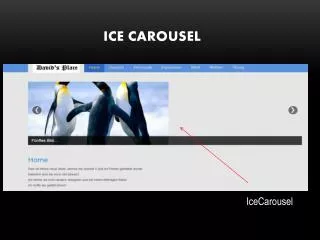
Ice Carousel. IceCarousel. Aktivierung. Hier muss ein Häckchen gesetzt werden um es zu aktivieren. Unter Erweiterungen/Module. Einstellung. Titel eingeben. Position MUSS icecarousel sein. Aussehen. Empfohlene Größe Width: 600 Height: 300 Theme: dark. Bilder.
Download
1 / 6
Download Presentation

Télécharger la présentation
Ice Carousel
An Image/Link below is provided (as is) to download presentation
Download Policy: Content on the Website is provided to you AS IS for your information and personal use and may not be sold / licensed / shared on other websites without getting consent from its author.
Content is provided to you AS IS for your information and personal use only.
Download presentation by click this link.
While downloading, if for some reason you are not able to download a presentation, the publisher may have deleted the file from their server.
During download, if you can't get a presentation, the file might be deleted by the publisher.
E N D
Presentation Transcript
Ice Carousel IceCarousel
Aktivierung Hier muss ein Häckchen gesetzt werden um es zu aktivieren Unter Erweiterungen/Module
Einstellung Titel eingeben Position MUSS icecarousel sein
Aussehen Empfohlene GrößeWidth: 600Height: 300Theme: dark
Bilder Hier gibt man die Quelle ein..z.B. einen hochgeladenen Bildordner namnes „Bilder“ Bilder lädt man in Inhalt/Medien hoch
Zuweisung Aussuchen, wo das Carousel angezeigt werden soll













More Related

Audio
Live Player