Download
1 / 6
60 likes | 166 Vues
This guide outlines the robust e-Assessment process at the University of Birmingham (UoB), detailing each stage from authoring assessments to reporting results. Instructors can learn how to create questions and group them into quizzes and exams using standard tools on Windows PCs or web browsers. The scheduling process for both formative and summative assessments is explained, alongside methods for delivering assessments securely through platforms like Blackboard. Finally, instructors are guided on reporting results through Enterprise Manager and gradebooks.

E N D
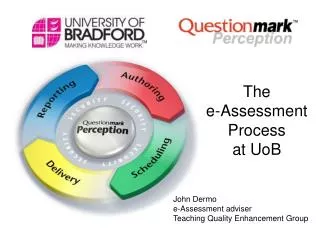
0 Thee-Assessment Processat UoB John Dermo e-Assessment adviser Teaching Quality Enhancement Group
0 Authoring Stage Create questions and group into quizzes, tests, exams and surveys using a Windows PC (or occasionally a web browser)
0 Scheduling Stage Formative: instructors schedule through Blackboard Connector Summative: admin manage participants, groups and schedules through Enterprise manager (qmldap.dll)
0 Delivery Stage Deliver assessments using a standard (or secure) browser, link from a secure webpage or Blackboard module.
0 Reporting Stage Instructors report on the results through reports in Enterprise manager or through BB gradebook.
students FORMATIVE / LOW-STAKES staff staff Low Stakes server (v. 4.3) shared repository Gatekeeper students QMLDAP Secure High stakes Server (v. 4.4) shared repository SITS ? Gatekeeper SUMMATIVE / HIGH-STAKES