Python Boot Camp: Midterm Announcements and Key Concepts Review
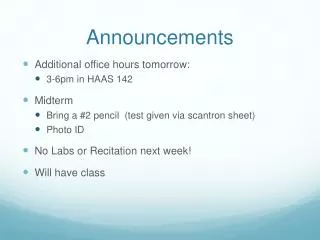
Tomorrow, we will hold additional office hours from 3-6 PM in HAAS 142. Don't forget to bring a #2 pencil and photo ID for the midterm, which will be administered via a Scantron sheet. Note that there will be no labs or recitations next week, but we will have our Python Boot Camp session. We will cover important topics such as libraries, sequences, indexation, conditional function calls, and the len function. Bring your questions from Piazza for a quick review!

Python Boot Camp: Midterm Announcements and Key Concepts Review
E N D
Presentation Transcript
Announcements • Additional office hours tomorrow: • 3-6pm in HAAS 142 • Midterm • Bring a #2 pencil (test given via scantron sheet) • Photo ID • No Labs or Recitation next week! • Will have class
Python Boot Camp!...? • Questions from Piazza • Quick review of Libraries • Sequences • Index into a sequence • [ ] notation
Function calls as conditions? • We have seen a lot of conditionals like: • if x == 3: or if y: or if (x<3) and (y%3 ==0): • But what about something like this? if myFun(x): This is equivalent to writing: z = myFun(x): if z:
Libraries • What is the difference between: • import library • from library import * • Both provide you with a mechanism to utilize additional functionality in your program • Student solution: Ill just use both! import library from library import *
Libraries >>> from math import* >>> math.sqrt(4) Traceback (most recent call last): File "<pyshell#153>", line 1, in <module> math.sqrt(4) NameError: name 'math' is not defined >>> import graphics >>> win = GraphWin() Traceback(most recent call last): File "<pyshell#1>", line 1, in <module> win = GraphWin() NameError: name 'GraphWin' is not defined
Returns • If a function does not specify a value to return it returns a special python value: “None” • Just because a function has a return statement in it, does NOT mean it will return a value >>> def example(x): if x < 10: print(x) else: return(30) >>> z = example(10) >>> print(z) 30 >>> z = example(9) 9 >>> print(z) None
Sequences in Python • We know of three types of sequences in Python • Strings: “Hello World” • Ranges: range(10) • Lists: [0,1,2,3,4,5] list(range(10))
Sequences • When we have multiple integersstored consecutively in memory we call it an Range • When we have multiple elements stored consecutively in memory we call it an List • When we have multiple characters stored consecutively in memory we call it a String • Both of these structures provide means to access individual values. • Ranges, Lists and Strings are 0 indexed
Indexes • Indexes provide us a quick mechanism for accessing a given element that is contained within a sequence
[] Notation • a[i] : gives a name to the ith element of a list • a = “Sally” • a[i] is equal to the i+1 character of Sally • a = list(range(0, 10)) • a[i] is equal to the i+1 number in the range of 0 to 9
Lists: Examples • a = list(range(0, 10)) • print(a) [0,1,2,3,4,5,6,7,8,9] • print(a[3]) 3 • print(a) [0,1,2,3,4,5,6,7,8,9]
Lets Make it More Concrete • a = 10 • b = range(0,5) • c= “Sally” a 10 b[0] b 0 b[1] 1 b[2] 2 b[3] 3 b[4] 4 c[0] c S c[1] a ….
Negative Indexes • What happens if we use a negative index? • Do we get an error? x = range(10) print(x[-1]) this will print 9 print(x[-10]) this will print 0 print(x[-11]) Error! >>> print(x[-11]) Traceback (most recent call last): File "<pyshell#173>", line 1, in <module> print(x[-11]) IndexError: range object index out of range
Lets Make it More Concrete • a = 10 • b = range(0,5) • c= “Sally” a 10 b[-5] b 0 b[-4] 1 b[-3] 2 b[-2] 3 b[-1] 4 c[-5] c S c[-4] a ….
Lists: Examples • a = list(range(0, 10)) • print(a) [0,1,2,3,4,5,6,7,8,9] • print(a[-3]) 7 • print(a) [0,1,2,3,4,5,6,7,8,9]
Lists • The [] can be used to index into an list, range, or string. For example: i = 0 x = list(range(0,10)) whilei < 10 : print (x[i]) i = i + 1 i = 0 x = range(0,10) whilei < 10 : print (x[i]) i = i + 1
Strings • The [] can be used in the same way on a string. For example: i = 0 x = “This is a string” whilei < 16 : print (x[i]) i = i + 1
Defensive Coding • These three examples suffer from the same defect! • The while loop is hard coded! i = 0 x = list(range(0,10)) whilei < 10 : print (x[i]) i = i + 1 i = 0 x = “This is a string” whilei < 17 : print (x[i]) i = i + 1 ERROR!
The len function • The len function gives you the “length” or number of elements in a sequence • Strings: number of characters in the string • Ranges: number of integers in the range • Lists: number of elements in the list >>> len(range(10)) 10 >>> len([0,1,2,3,4,5]) 6 >>> len("this is a string") 16
The len function • A better way to write the previous code: i = 0 x = “This is a string” whilei < len(x): print (x[i]) i = i + 1
Clicker Question: Are these two functions equivalent? defprintByCharacter(str) i = 0 whilei < len(str): print (str[i]) i = i + 1 defprintByCharacter(str) i = 0 whilei < 16: print (str[i]) i = i + 1 A: yes B: no
Why is this important? • We want to write general purpose functions defprintByCharacter(str) i = 0 whilei < len(str): print (str[i]) i = i + 1
Why is this important? • We want to write general purpose functions defprintByCharacter(str) i = 0 whilei < len(str): if(i < 16): print (str[i]) i = i + 1
Typical mistakes • Undershooting the bounds • a = “hello” a[-6] • Overshooting the bounds • a = “hello” a[5] • Off by one • a[0] vs a[1] • By convention we use 0-based indexing • a=“hello” • print(a[0]) • print(a[1])
Homework • Study for the exam! • Work on Project 2
Announcements • Don’t Panic! • Midterm is curved • Mid Semester Class Evaluation • https://portals.cs.purdue.edu/ • log in using your Purdue career account ID and password, • click on "Course Evaluations", and then • click on "Mid-Semester Evaluations". • PreLab structure • Common errors section
Python Boot Camp • String Slicing • Lists • Heterogeneous vs homogenous • Assignment • Lists containing other sequences
CQ:Are these programs equivalent? i = 0 x = “This is a string” whilei < len(x): print (x[i]) i = i + 1 x = “This is a string” for y in x: print (y) A: yes B: no
What is going on here? x = “This is a string” for y in x: print (y) x T h i s Under the hood we are doing something similar to: i y = x[j] ….
CQ:Are these programs equivalent? i = 0 x = “This is a string” whilei < len(x): print (x[i]) i = i + 1 x = “This is a string” i = 0 – len(x) whilei < 0: print (x[i]) i = i + 1 A: yes B: no
Slicing • In addition to selecting a single value from an array or string the [] can be used to select values in a special range. x = “This is a string” print x[0] print x[0:5] print x[:3] print x[3:] print x[-1:] print x[:-1]
Slicing x = “This is a string” print x[0] T print x[0:5] This print x[:3] Thi print x[3:] s is a string print x[-1:] g print x[:-1] This is a strin
Lists • We can also store more complex elements into an list. For example, consider these two cases: x = “ABCD” y =[“A”,”B”,”C”,”D”] print x ABCD print y ['A', 'B', 'C', 'D']
Lists • y is an example of a list of string. Each element is a string. We could expand it as follows: • As you can see each element can be a different length. They can also be different types: y =[“ABCD”, ”BCD”, ”CD”, ”D”] y =[“ABCD”, [1,2,3] , ”CD”, ”D”]
Lists • Suppose we wanted to extract the value 3 • The first set of [] get the array in position 1 of y. The second [] is selecting the element in position 2 of that array. This is equiv. to: y =[“ABCD”, [1,2,3] , ”CD”, ”D”] y[1][2] z = y[1] z[2]
Assigning to Lists • The [] syntax not only allows us to access a given element, it lets us access that memory location • Namely, we can assign to that location • b[2] = 100 • print(b[2]) • b[2] = b[2] – 50 • print(b[2]) a 10 b[0] b 0 b[1] 1 b[2] 2 b[3] 3 b[4] 4
Strings are Immutable • What do we mean by immutable? • We cannot assign to strings like we do arrays i = 0 x = “This is a string” x[i] = ‘b’
Ranges are Immutable • What do we mean by immutable? • We cannot assign to strings like we do arrays i = 0 x = range(10) x[i] = ‘b’
Operations on Lists • Just like we can concatenate strings we can concatenate lists • print ([1, 2, 3] + [4, 5, 6]) • Will print: [1, 2, 3, 4, 5, 6] • Just like we can slice strings we can also slice lists • b = [1, 2, 3, 4, 5, 6] • print (b[2:5]) • Will print [3, 4, 5]
Advanced List Operations • We once again use the object.method() syntax • This time the list is the object • Notice the list type supports different methods from the string type • c = [1, 2, 3, 4, 5] • c.append(6) • Results in c having an additional element: • [1, 2, 3, 4, 5, 6]
CQ:Are these programs equivalent? 1 2 b = [‘h’,’e’,’l’,’l’,’o’] defmyFun(l): l.append(6) return l print(myFun(b)) b = [‘h’,’e’,’l’,’l’,’o’] defmyFun(l): l +[6] return l print(myFun(b)) A: yes B: no
What can we do to make them equivalent? • Now program 2 will print the same as program 1 • But what about the value of b after the function? b = [‘h’,’e’,’l’,’l’,’o’] defmyFun(l): l = l +[6] return l print(myFun(b))
Advanced List Operations • L = [0, 1, 2] • L.extend([4, 5, 6]) • print(L) will print: [0, 1, 2, 4, 5, 6] • L.extend([“Hello”]) • print(L) will print: [0, 1, 2, 4, 5, 6, “hello”] • L.instert(0, “a”) • print(L) will print: [“a”, 0, 1, 2, 4, 5, 6, “hello”] • L.instert(2, “a”) • print(L) will print: [“a”, 0, “a”, 1, 2, 4, 5, 6, “hello”]
A special case for insert • L = [0, 1, 2] • L.insert(len(L), 3) • print (L) will print [0, 1, 2, 3] • L.insert(3000, 4) • print (L) will print [0, 1, 2, 3, 4] • Insert also works with negative indexes • Try it and see what you get!
CQ:Are these programs equivalent? 1 2 b = [‘h’,’e’,’l’,’l’,’o’] b.insert(len(b), “w”) print(b) b = [‘h’,’e’,’l’,’l’,’o’] b.append(“w”) print(b) A: yes B: no
Advanced List Operations • L = [0, 1, 2, 0] • L.reverse() • print(L) will print: [0, 2, 1, 0] • L.remove(0) • print(L) will print: [2, 1, 0] • L.remove(0) • print(L) will print: [2, 1] • printL.index(2) will print 0
Why are Lists useful? • They provide a mechanism for creating a collection of items defdoubleList(b): i = 0 whilei < len(b): b[i] = 2 * b[i] i = i +1 return (b) print(doubleList([1,2,3]))