Download
1 / 1
Create a Multimedia Table with Pictures and Audio Downloads
10 likes | 137 Vues
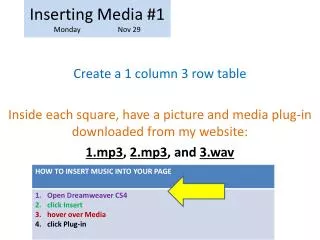
In this guide, we'll show you how to insert a 1-column, 3-row table into your document. Each square of the table will contain a picture and a media plug-in, allowing you to download audio files directly from my website. You will be able to include three types of audio formats: MP3, WAV, and more. Follow our step-by-step instructions to enhance your content with multimedia elements that engage your audience effectively.

Télécharger la présentation 
Create a Multimedia Table with Pictures and Audio Downloads
An Image/Link below is provided (as is) to download presentation
Download Policy: Content on the Website is provided to you AS IS for your information and personal use and may not be sold / licensed / shared on other websites without getting consent from its author.
Content is provided to you AS IS for your information and personal use only.
Download presentation by click this link.
While downloading, if for some reason you are not able to download a presentation, the publisher may have deleted the file from their server.
During download, if you can't get a presentation, the file might be deleted by the publisher.
E N D
Presentation Transcript
Inserting Media #1Monday Nov 29 Create a 1 column 3 row table Inside each square, have a picture and media plug-in downloaded from my website: 1.mp3, 2.mp3, and 3.wav







More Related