Visualizing Simplex Algorithm in 3D LP: A Tool for Linear Programming
250 likes | 334 Vues
Explore a user-friendly tool visualizing the Simplex Algorithm in 3D linear programming. The tool allows visualization of convex feasible regions and constraints, aiding in understanding the LP solving process.


Visualizing Simplex Algorithm in 3D LP: A Tool for Linear Programming
E N D
Presentation Transcript
SohamUday Mehta CS 270, Spring 2013 ProjectA Visual TOOL FOR THE simplex method in LP
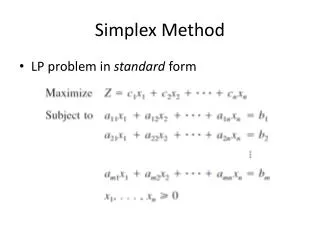
Linear Programming in 3 variables • Subject to
Goals • Visualize the convex feasible region specified by constraints (in 3D)
Goals • Visualize the convex feasible region specified by constraints (in 3D) • Visualize Simplex Algorithm to solve the LP (simple version)
Visualization • Each constraint becomes a polygon bounding the convex feasible region
Visualization • Each constraint becomes a polygon bounding the convex feasible region • Start with 3 Quads for • Assume we have all polygons for current convex region and we want to add a new constraint
Visualization • Each constraint becomes a polygon bounding the convex feasible region • Start with 3 Quads for • Assume we have all polygons for current convex region and we want to add a new constraint • Need to clip all polygons by new constraint
Visualization • Find the ‘side’ of plane each vertex of polygon is on • If an edge of poly cuts plane, add new vertex and remove the ‘wrong’ side vertex
Visualization • Each constraint may also create a new polygon
Visualization • Each constraint may also create a new polygon
Visualization • Each constraint may also create a new polygon • Store ‘new’ vertices created by clipping existing polygons
Visualization • Each constraint may also create a new polygon • Store ‘new’ vertices created by clipping existing polygons • Remove duplicates
Visualization • Each constraint may also create a new polygon • Store ‘new’ vertices created by clipping existing polygons • Remove duplicates, re-order vertices, and create new poly
Simplex Algorithm • Start with a random vertex
Simplex Algorithm • Start with a random vertex • Find extreme directions at current vertex • Pick maximum improvement direction • If no improvement in any direction, stop
Simplex Algorithm • Start with a random vertex • Find extreme directions at current vertex • Pick maximum improvement direction • If no improvement in any direction, stop • Find max. feasible step and move to next vertex • Go back to 2
Choosing the start vertex • First add 1 auxiliary variable to each constraint to convert it to an equation, create matrix • Randomly choose from the and set to , solve the equations for rest If matrix is not invertible or some , solve with different choice The ones set to zero are called non-basic, rest are basic – store this in a boolean vector “B”
Choosing the start vertex • First add 1 auxiliary variable to each constraint to convert it to an equation, create matrix • Randomly choose from the and set to , solve the equations for rest • If matrix is not invertible or some , solve with different choice • The ones set to zero are called non-basic, rest are basic – store this in a boolean vector “B”
Finding directions at any vertex • Each non-basic variable gives a direction For , set 1 non-basic value to 1, other two to 0 and solve for rest (free upto a constant) Pick direction which gives maximum If all directions give , reached maximum, STOP
Finding directions at any vertex • Each non-basic variable gives a direction • For , set 1 non-basic value to 1, other two to 0 and solve for rest (free upto a constant) • Pick direction which gives maximum • If all directions give , reached maximum, STOP
Finding the next vertex • Choose step size • Move to next vertex
Finding the next vertex • Choose step size • Move to next vertex • Update “B” vector to correspond to new vertex: non-basic generating the max direction becomes basic, the basic fixing becomes non-basic
Conclusion • Will be available for download
Conclusion • Will be available for download • Thanks for your attention • Comments / Questions?