SlideServe
Menu
Préférences
© SlideServe · v2026

HTML5 Canvas Element

ormand avatar
35 diapositives · 584 Views · Sep 21, 2014

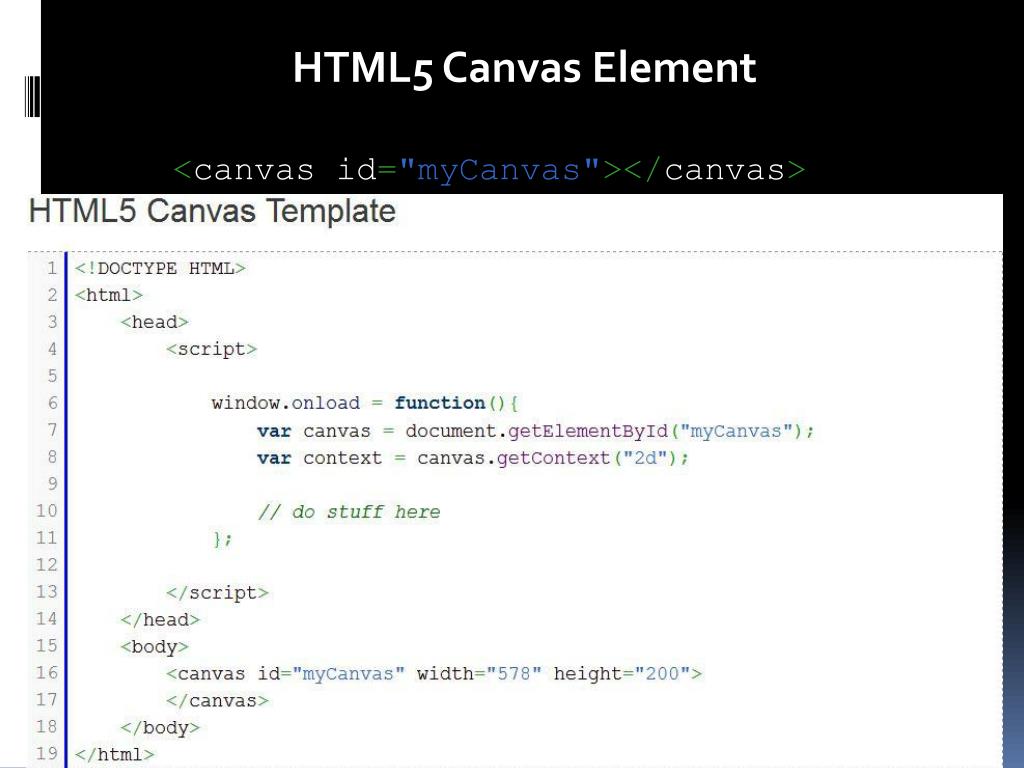
HTML5 Canvas Element. < canvas id = "myCanvas" ></ canvas >. HTML5 Canvas Line. To create a line using HTML5 Canvas, we can use the moveTo() , lineTo() , and stroke() methods. HTML5 Canvas Line Width.
HTML5 Canvas Element - slide 1
01 / 35HTML5 Canvas Element
1 / 17

Télécharger la présentation

HTML5 Canvas Element
Une image / un lien ci-dessous est fourni (tel quel) pour télécharger la présentation

Politique de téléchargement : le contenu du site vous est fourni TEL QUEL pour votre information et votre usage personnel ; il ne peut être vendu, concédé sous licence ni partagé sur d’autres sites sans l’accord de son auteur.Le contenu vous est fourni TEL QUEL, pour votre information et votre usage personnel uniquement. Téléchargez la présentation en cliquant sur ce lien. Lors du téléchargement, si vous ne parvenez pas à télécharger une présentation, l’éditeur a peut-être supprimé le fichier de son serveur.Pendant le téléchargement, si vous ne parvenez pas à obtenir une présentation, le fichier a peut-être été supprimé par l’éditeur.

F I N

Plus de contenu associé

Transcription de la présentation
  1. HTML5 Canvas Element <canvas id="myCanvas"></canvas>

  2. HTML5 Canvas Line To create a line using HTML5 Canvas, we can use the moveTo(), lineTo(), and stroke() methods.

  3. HTML5 Canvas Line Width To define the width of an HTML5 Canvas line, we can use the lineWidth property of the canvas context.

  4. HTML5 Canvas Line Color To set the color of an HTML5 Canvas line, we can use the strokeStyle property of the canvas context. context.strokeStyle=[value];

  5. HTML5 Canvas Line Cap To add a cap to an HTML5 Canvas line, we can use the lineCap property. context.lineCap=[value];

  6. HTML5 Canvas Arc To create an arc with HTML5 Canvas, we can use the arc() method. context.arc(centerX, centerY, radius, startingAngle, endingAngle, antiClockwise);

  7. HTML5 Canvas Quadratic Curve To create a quadratic curve with HTML5 Canvas, we can use the quadraticCurveTo() method. Quadratic curves are defined by the context point, a control point, and an ending point. context.quadraticCurveTo(controlX, controlY, endX, endY);

  8. HTML5 Canvas Bezier Curve To create a Bezier curve with HTML5 Canvas, we can use the bezierCurveTo() method. context.bezierCurveTo(controlX1, controlY1, controlX2, controlY2, endX, endY);

  9. HTML5 Canvas Path To create a path with HTML5 Canvas, we can connect multiple subpaths. The ending point of each successive subpath becomes the new context point context.beginPath();

  10. HTML5 Canvas Line Join To set the line join style of an HTML5 Canvas path, we can use the lineJoin context property. context.lineJoin=[value];

  11. HTML5 Canvas Rounded Corners To created rounded corners using HTML5 Canvas, we can use the arcTo() method which is defined by a control point, an ending point, and a radius. context.arcTo(controlX,controlY,endX,endY,radius);

  12. HTML5 Canvas Custom Shape To create a custom shape with HTML5 Canvas, we can create a path and then close it using the closePath() method. We can use the lineTo(), arcTo(), quadraticCurveTo(), or bezierCurveTo() methods to construct each subpath which makes up our shape. context.closePath();

  13. HTML5 Canvas Shape Fill To fill an HTML5 Canvas shape, we can use the fillStyle property of the canvas context and the fill() method. context.fillStyle=[value]; context.fill();

  14. HTML5 Canvas Rectangle To create a rectangle using HTML5 Canvas, we can use the rect() method. An HTML5 Canvas rectangle is positioned by the topLeftCornerX and topLeftCornerY parameters, and is sized with the width and height parameters. context.rect(topLeftCornerX,topLeftCornerY,width,height);

  15. HTML5 Canvas Circle To draw a circle with HTML5 Canvas, we can create an arc using the arc() method and define the starting angle as 0 and the ending angle as 2*PI. context.arc(centerX,centerY,radius,0,2*Math.PI,false);

  16. HTML5 Canvas Linear Gradient o create a linear gradient with HTML5 Canvas, we can use the createLinearGradient() method. var grd=context.createLinearGradient(startX, startY, endX, endY); grd.addColorStop(offset, color);

  17. HTML5 Canvas Image To create an image using HTML5 Canvas, we can use the drawImage() method which requires an image object and a destination point. The destination point is relative to the top left corner of the image. context.drawImage(imageObj,destX,destY);

  18. HTML5 Canvas Pattern To create a pattern with the HTML5 Canvas, we can define a pattern with the createPattern() method var pattern = context.createPattern(imageObj, repeatOption); context.fillStyle= pattern; context.fill();