Creating a Custom String Concatenation Function in C Using Structures
This guide explains how to implement a function `my_strcat` in C that concatenates two strings and returns a pointer to a dynamically allocated result. It details input requirements for the strings, and highlights a specific example of concatenating "hello_" and "world!" to yield "hello_world!". Additionally, it introduces the concept of structures in C, demonstrating how to define and manipulate complex data types like complex numbers. You'll learn to access structure members and define new types for ease of use in your C programs.

Creating a Custom String Concatenation Function in C Using Structures
E N D
Presentation Transcript
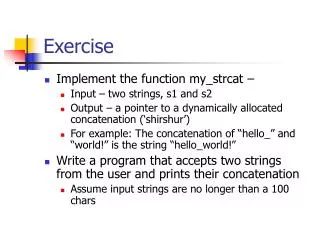
Exercise • Implement the function my_strcat – • Input – two strings, s1 and s2 • Output – a pointer to a dynamically allocated concatenation (‘shirshur’) • For example: The concatenation of “hello_” and “world!” is the string “hello_world!” • Write a program that accepts two strings from the user and prints their concatenation • Assume input strings are no longer than a 100 chars
What’s wrong with this? char *my_strcat(char *str1, char *str2) { int len; char result[500]; /* Let’s assume this is large enough */ len = strlen(str1); strcpy(result, str1); strcpy(result+len, str2); return result; }
Solution my_strcat.c (my_strcat2.c)
Structures • Often we want to be able to manipulate ‘logical entities’ as a whole • For example, complex numbers, dates, student records, etc’ • Each of these must be composed of more than one variable, but are logically units • A struct (short for structure) is a collection of variables of different types, gathered into one super-variable • It is used to define more complex data types • Variables in a struct are called members or fields
Example – complex numbers. The following is the definition of a new ‘variable’ of type complex number: • struct complex { int real; int img; }; • Once we define a structure, we can treat it as any type. • In a program, we can then write: struct complex num1, num2, num3;
Access structure members • If A is of some structure with a member named x, then A.x is that member of A • struct complex C;C.real = 0; • If A is a pointer to a structure with a member x, then A->x is that member of the variable pointed by A. • This is simply shorthand for - (*A).x • struct complex *pc = &C;pc->real = 1;
A more convenient usage with typedef • An alternative definition: typedefstruct complex_t { int real; int img; } complex; • Now the program has a new variable type - “complex”. • This way we don’t have to write “struct complex” every time! • For example, we can define two complex numbers in the following line: complex num1, num2;
Examples AddComplex.c
c a b img img img real real real … … … … … … AddComplex – step by step complex a, b, c; printf(“…"); scanf("%lf%lf",&(a.real),&(a.img)); printf(“…"); scanf("%lf%lf",&(b.real),&(b.img)); c = AddComp(a,b); printf(“result = %g+%gi\n",c.real,c.img); return 0;
c a b img img img real real real … … … … … … AddComplex – step by step complex a, b, c; printf(“…"); scanf("%lf%lf",&(a.real),&(a.img)); printf(“…"); scanf("%lf%lf",&(b.real),&(b.img)); c = AddComp(a,b); printf(“result = %g+%gi\n",c.real,c.img); return 0;
c a b img img img real real real 1.0 … … … … 2.0 AddComplex – step by step complex a, b, c; printf(“…"); scanf("%lf%lf",&(a.real),&(a.img)); printf(“…"); scanf("%lf%lf",&(b.real),&(b.img)); c = AddComp(a,b); printf(“result = %g+%gi\n",c.real,c.img); return 0;
c a b img img img real real real 1.0 … … … … 2.0 AddComplex – step by step complex a, b, c; printf(“…"); scanf("%lf%lf",&(a.real),&(a.img)); printf(“…"); scanf("%lf%lf",&(b.real),&(b.img)); c = AddComp(a,b); printf(“result = %g+%gi\n",c.real,c.img); return 0;
c a b img img img real real real 1.0 3.0 … … 4.0 2.0 AddComplex – step by step complex a, b, c; printf(“…"); scanf("%lf%lf",&(a.real),&(a.img)); printf(“…"); scanf("%lf%lf",&(b.real),&(b.img)); c = AddComp(a,b); printf(“result = %g+%gi\n",c.real,c.img); return 0;
c a b img img img real real real 1.0 3.0 … … 4.0 2.0 AddComplex – step by step complex a, b, c; printf(“…"); scanf("%lf%lf",&(a.real),&(a.img)); printf(“…"); scanf("%lf%lf",&(b.real),&(b.img)); c = AddComp(a,b); printf(“result = %g+%gi\n",c.real,c.img); return 0;
z x y img img img real real real 1.0 3.0 … … 4.0 2.0 AddComplex – step by step complex AddComp(complex x, complex y) { complex z; z.real = x.real + y.real; z.img = x.img + y.img; return z; }
z x y img img img real real real 1.0 3.0 … 6.0 4.0 2.0 AddComplex – step by step complex AddComp(complex x, complex y) { complex z; z.real = x.real + y.real; z.img = x.img + y.img; return z; }
z x y img img img real real real 1.0 3.0 4.0 6.0 4.0 2.0 AddComplex – step by step complex AddComp(complex x, complex y) { complex z; z.real = x.real + y.real; z.img = x.img + y.img; return z; }
z x y img img img real real real 1.0 3.0 4.0 6.0 4.0 2.0 AddComplex – step by step complex AddComp(complex x, complex y) { complex z; z.real = x.real + y.real; z.img = x.img + y.img; return z; }
c a b img img img real real real 1.0 3.0 4.0 6.0 4.0 2.0 AddComplex – step by step complex a, b, c; printf(“…"); scanf("%lf%lf",&(a.real),&(a.img)); printf(“…"); scanf("%lf%lf",&(b.real),&(b.img)); c = AddComp(a,b); printf(“result = %g+%gi\n",c.real,c.img); return 0;
c a b img img img real real real 1.0 3.0 4.0 6.0 4.0 2.0 AddComplex – step by step complex a, b, c; printf(“…"); scanf("%lf%lf",&(a.real),&(a.img)); printf(“…"); scanf("%lf%lf",&(b.real),&(b.img)); c = AddComp(a,b); printf(“result = %g+%gi\n",c.real,c.img); return 0;
Exercise • Implement the MultComplex function – • Input - two complex numbers • Output – their multiplication • Note - If x=a+ib and y=c+id then: z = xy = (ac-bd)+i(ad+bc) • Write a program that uses the above function to multiply two complex numbers given by the user
Solution MultiplyComplex.c
Miscellaneous structure trivia • Structure members may be ordinary variable types, but also other structures and even arrays! • Structures can therefore be rather large and take up a lot of space • Many times we prefer to pass structures to functions by address, and not by value • Thus a new copy of the structure is not created – just a pointer to the existing structure
More trivia • Structures cannot be compared using the == operator • They must be compared member by member • Usually this will be done in a separate function • Structures can be copied using the = operator • Member-wise copy
Example Is_In_Circle.c
d (dot) x y … … c (circle) center (dot) radius x y … … … Is_in_circle – step by step printf(“Enter dot\n"); scanf("%lf%lf",&d.x,&d.y); printf("Enter circle center\n"); scanf("%lf%lf",&c.center.x,&c.center.y); printf("Enter circle radius\n"); scanf("%lf",&c.radius); if (IsInCircle(&d, &c)) printf("dot is in circle\n"); else printf("dot is out of circle\n");
d (dot) x y … … c (circle) center (dot) radius x y … … … Is_in_circle – step by step printf(“Enter dot\n"); scanf("%lf%lf",&d.x,&d.y); printf("Enter circle center\n"); scanf("%lf%lf",&c.center.x,&c.center.y); printf("Enter circle radius\n"); scanf("%lf",&c.radius); if (IsInCircle(&d, &c)) printf("dot is in circle\n"); else printf("dot is out of circle\n");
d (dot) x y 1.0 2.0 c (circle) center (dot) radius x y … … … Is_in_circle – step by step printf(“Enter dot\n"); scanf("%lf%lf",&d.x,&d.y); printf("Enter circle center\n"); scanf("%lf%lf",&c.center.x,&c.center.y); printf("Enter circle radius\n"); scanf("%lf",&c.radius); if (IsInCircle(&d, &c)) printf("dot is in circle\n"); else printf("dot is out of circle\n");
d (dot) x y 1.0 2.0 c (circle) center (dot) radius x y … … … Is_in_circle – step by step printf(“Enter dot\n"); scanf("%lf%lf",&d.x,&d.y); printf("Enter circle center\n"); scanf("%lf%lf",&c.center.x,&c.center.y); printf("Enter circle radius\n"); scanf("%lf",&c.radius); if (IsInCircle(&d, &c)) printf("dot is in circle\n"); else printf("dot is out of circle\n");
d (dot) x y 1.0 2.0 c (circle) center (dot) radius x y … 0.0 0.0 Is_in_circle – step by step printf(“Enter dot\n"); scanf("%lf%lf",&d.x,&d.y); printf("Enter circle center\n"); scanf("%lf%lf",&c.center.x,&c.center.y); printf("Enter circle radius\n"); scanf("%lf",&c.radius); if (IsInCircle(&d, &c)) printf("dot is in circle\n"); else printf("dot is out of circle\n");
d (dot) x y 1.0 2.0 c (circle) center (dot) radius x y … 0.0 0.0 Is_in_circle – step by step printf(“Enter dot\n"); scanf("%lf%lf",&d.x,&d.y); printf("Enter circle center\n"); scanf("%lf%lf",&c.center.x,&c.center.y); printf("Enter circle radius\n"); scanf("%lf",&c.radius); if (IsInCircle(&d, &c)) printf("dot is in circle\n"); else printf("dot is out of circle\n");
d (dot) x y 1.0 2.0 c (circle) center (dot) radius x y 5 0.0 0.0 Is_in_circle – step by step printf(“Enter dot\n"); scanf("%lf%lf",&d.x,&d.y); printf("Enter circle center\n"); scanf("%lf%lf",&c.center.x,&c.center.y); printf("Enter circle radius\n"); scanf("%lf",&c.radius); if (IsInCircle(&d, &c)) printf("dot is in circle\n"); else printf("dot is out of circle\n");
d (dot) x y 1.0 2.0 c (circle) center (dot) radius x y 5 0.0 0.0 Is_in_circle – step by step printf(“Enter dot\n"); scanf("%lf%lf",&d.x,&d.y); printf("Enter circle center\n"); scanf("%lf%lf",&c.center.x,&c.center.y); printf("Enter circle radius\n"); scanf("%lf",&c.radius); if (IsInCircle(&d, &c)) printf("dot is in circle\n"); else printf("dot is out of circle\n");
(dot) x y 1.0 2.0 (circle) center (dot) radius x y 5 0.0 0.0 Is_in_circle – step by step x_dist y_dist int IsInCircle(dot *p_dot, circle *p_circle) { double x_dist,y_dist; x_dist = p_dot->x - p_circle->center.x; y_dist = p_dot->y - p_circle->center.y; if (x_dist*x_dist + y_dist*y_dist <= p_circle->radius*p_circle->radius) return 1; return 0; } … … p_dot p_circle 756 1024
(dot) x y 1.0 2.0 (circle) center (dot) radius x y 5 0.0 0.0 Is_in_circle – step by step x_dist y_dist int IsInCircle(dot *p_dot, circle *p_circle) { double x_dist,y_dist; x_dist = p_dot->x - p_circle->center.x; y_dist = p_dot->y - p_circle->center.y; if (x_dist*x_dist + y_dist*y_dist <= p_circle->radius*p_circle->radius) return 1; return 0; } 1.0 … p_dot p_circle 756 1024
(dot) x y 1.0 2.0 (circle) center (dot) radius x y 5 0.0 0.0 Is_in_circle – step by step x_dist y_dist int IsInCircle(dot *p_dot, circle *p_circle) { double x_dist,y_dist; x_dist = p_dot->x - p_circle->center.x; y_dist = p_dot->y - p_circle->center.y; if (x_dist*x_dist + y_dist*y_dist <= p_circle->radius*p_circle->radius) return 1; return 0; } 1.0 2.0 p_dot p_circle 756 1024
(dot) x y 1.0 2.0 (circle) center (dot) radius x y 5 0.0 0.0 Is_in_circle – step by step x_dist y_dist int IsInCircle(dot *p_dot, circle *p_circle) { double x_dist,y_dist; x_dist = p_dot->x - p_circle->center.x; y_dist = p_dot->y - p_circle->center.y; if (x_dist*x_dist + y_dist*y_dist <= p_circle->radius*p_circle->radius) return 1; return 0; } 1.0 2.0 p_dot p_circle 756 1024
(dot) x y 1.0 2.0 (circle) center (dot) radius x y 5 0.0 0.0 Is_in_circle – step by step x_dist y_dist int IsInCircle(dot *p_dot, circle *p_circle) { double x_dist,y_dist; x_dist = p_dot->x - p_circle->center.x; y_dist = p_dot->y - p_circle->center.y; if (x_dist*x_dist + y_dist*y_dist <= p_circle->radius*p_circle->radius) return 1; return 0; } 1.0 2.0 p_dot p_circle 756 1024
d (dot) x y 1.0 2.0 c (circle) center (dot) radius x y 5 0.0 0.0 Is_in_circle – step by step printf(“Enter dot\n"); scanf("%lf%lf",&d.x,&d.y); printf("Enter circle center\n"); scanf("%lf%lf",&c.center.x,&c.center.y); printf("Enter circle radius\n"); scanf("%lf",&c.radius); if (IsInCircle(&d, &c)) printf("dot is in circle\n"); else printf("dot is out of circle\n");
Exercise • Write a struct that represents a date (day, month, year) • Write a function that increments the datevoid IncDate(Date *d); • For example – 31.12.05 -> 1.1.06
Solution IncDate.c
Structures containing arrays • A structure member that is an array does not ‘behave’ like an ordinary array • When copying a structure that contains a member which is an array, the array is copied element by element • Not just the address gets copied • For example - array_member.c • Reminder – ordinary arrays can’t be copied simply by using the ‘=‘ operator • They must be copied using a loop
Structures containing arrays • The same happens when passing the structure to a function • Changing the array inside the function won’t change it in the calling function • Reminder – when passing an ordinary array to a function, all that gets passed is the address of its first element • Hence every change to the array within the function, changes the array in the calling function
Pointers are another matter • If the member is a pointer, for example to a dynamically allocated array, all that gets copied is the pointer (the address) itself • For example, pointer_member.c • Hence, we should take extra carewhen manipulating structures that contain pointers
Exiting the program void exit(int status); • Sometimes an error occurs and we want the program to immediately exit • The exit function closes all open files, frees all allocated memory, and exits the program • Equivalent to calling ‘return’ within main • Remember to #include <stdlib.h> • See strcpy_with_exit.c

![[Exercise Name] Functional Exercise](https://cdn0.slideserve.com/621913/exercise-name-functional-exercise-dt.jpg)

![[Exercise Name] Functional Exercise](https://cdn1.slideserve.com/1717560/exercise-name-functional-exercise-dt.jpg)






![[Exercise Name] Functional Exercise](https://cdn3.slideserve.com/6680259/exercise-name-functional-exercise-dt.jpg)
![[Exercise Name] Tabletop Exercise](https://cdn4.slideserve.com/9191716/exercise-name-tabletop-exercise-dt.jpg)