Download
1 / 23
230 likes | 381 Vues
This overview covers the principles of the Domain Name System (DNS) as a hierarchical, distributed database primarily used for mapping domain names to IP addresses. It discusses DNS architecture, including the logical tree structure of DNS servers and the roles of clients. Additionally, we delve into the operations of electronic mail and file transfer protocols, emphasizing technologies like FTP, SMTP, and their functions in managing application-layer traffic. The discussion further highlights file server dynamics, virtual terminals, and recent developments in web technology.

E N D
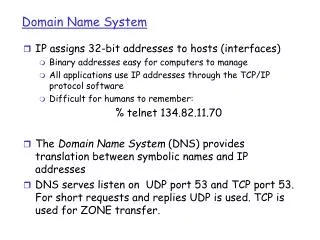
Domain Name System • A heirarchial, distributed database • A service primarily aimed at mapping names to IP addresses • Partitioned for ease of administration
. gov edu com utexas tamu ibm austin cs mac1 solar mac1 DNS Structure (partial)
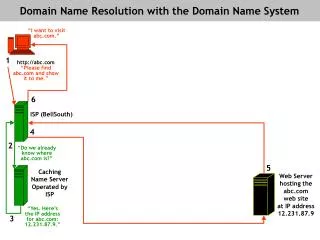
DNS -- How it Works • DNS Servers in a logical tree • DNS clients on every host • Iterative Queries • Recursive Queries
ARP • Address Resolution Protocol {translate network layer address to physical address} • Part of general resolution procedure: name {e.g., neuron.cs.tamu.edu} DNS IP Address {e.g., 128.194.133.1} ARP Ethernet address {e.g., 08:00:20:08:58:78}
Application Layer • File Transfer, Access and Management • virtual file store • file servers and requesting clients • Electronic Mail • process to process traffic expected to dominate Internet • actually email dominates the Internet • Virtual Terminals • representing the abstract state of the real terminal • Remote Job Execution • JTM: Job Transfer and Manipulation
ISO Applications • FTAM ~ FTP File Transfer, Access & Manipulation • VTS ~ TELNET Virtual Terminal Service • JTM ~ ??? Job Transfer & Manipulation {maybe rsh, RPC?} • MHS ~ SMTP Message Handling System (X.400)
“applications” SASE SASE CASE ISO Terminology [Specific|Common] Application Service Elements “think of them as programming libraries or APIs”
ISO Service Elements(examples) • Association Control Service Element (primitives) • Commitment, Concurrency and Recovery • atomic actions • two phase commit
File Servers • 1. File Structure • 2. File Attributes • e.g. identifier, size of storage, access control • 3. File Operations • create, delete move • OSI has defined virtual filestore operations
Replicated Files • Why multiple file servers? • 1. To split the workload over multiple servers. • 2. To allow file access to occur even if one file server is down • 3. To increase reliability by having independent backups of each file • Updates • Voting
Electronic Mail • Motis and X.400CCITT has aligned them for compatibilityMay replace SMTP • The user agentuser interface • Message transfer agentpost office
Virtual Terminals • Scroll mode terminalsno local resources; dumb display and transmission • Page mode terminals25 x 80 character displayscreen editing via termcap • Form mode terminalslocal processing enabled • Bitmapped terminals like X stations
Case Study: Internet • File Transfer • Electronic Mail • Virtual Terminals
Getting Started • RARP • BOOTP • TFTP • DHCP
File Transfer Protocol • FTP recognizes four file types: • 1. Image • bit by bit transfer • 2. ASCII • 3. EBCDIC • 4. Logical Byte files • binary files which use byte size other than 8 bits
Electronic Mail • Pioneered by ARPANET • RFC 822 (widely used) • Simple Mail Transfer Protocol (SMTP) • Supports only ASCII text • name@domain addressing
Virtual Terminals - TELNET • Designed for scroll mode terminals • Hit a key , 8-bit bytes are sent • 95 ASCII and 7 control characters legal
USENET--HOW TO AVOID GRADUATION • Internet compatible (now) • Variety of newsgroups • Moderated newsgroups • NNTP, Network News Transfer Protocol, allows selective downloading of messagesto multiple sites
The Web • “the” killer application for the Internet • Two components for popularity • http combines multiple access (gopher, ftp, etc) methods • hypertext interface supports point-and-click interface • Who will organize the information? • No one... • Database experts • Librarians (!)
Web Terminology • Web Browsers • Netscape • Mosaic • Web Servers • http daemon • httd.conf - main server config file • srm.con - server resource config file • access.conf - global access control file • Home Page • Eg., www.cs.tamu.edu • HTML • HyperText Markup Language
HTML Document <HTML> <HEAD> <TITLE>Willis Marti’s Homepage</TITLE> <LINK REV=“OWNER” HREF=“mailto:willis@cs.tamu.edu”> </HEAD> <BODY> <IMG SRC=“my-logo.gif” ALT=“logo”> <H1> Sample HTML Document</H1> <EM> To demonstrate HTML </EM> <HR> ....
Web Future Directions • HTML Enhancements • Secure Transactions • Uniform Naming • Librarians & Brokers • Information “push” or “pull”
Layer 7 Summary • Service Element Model • Not all Apps belong here... • Common Network Services