Download
1 / 5
50 likes | 176 Vues
The Editor facilitates the entry of check and rule bodies within a structured dictionary interface. It is organized into two or three panes. The left pane displays categories of objects for checks, the mid-pane lists sub-categories, and the right pane (if applicable) shows operators for the selected items. The same structure applies for rules. This system supports various Extended EKL types, including Core and Advanced EKL, and utilizes different object types (e.g., real, boolean, string) to enhance functionality and understanding.

E N D
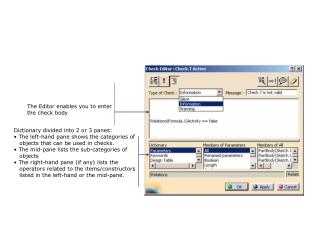
The Editor enables you to enter the check body • Dictionary divided into 2 or 3 panes: • The left-hand pane shows the categories of objects that can be used in checks. • The mid-pane lists the sub-categories of objects • The right-hand pane (if any) lists the operators related to the items/constructors listed in the left-hand or the mid-pane.
The Editor enables you to enter the Rule body • Dictionary divided into 2 or 3 panes: • The left-hand pane shows the categories of objects that can be used in rules. • The mid-pane lists the sub-categories of objects • The right-hand pane (if any) lists the operators related to the items and constructors listed in the left-hand or the mid-pane.
Extended EKL (X-EKL) Advanced EKL (A-EKL) Core EKL (C-EKL) Mathematic EKL (M-EKL)
Part PartBody Pad.1 Pad.2
Object Type Literal Type VoidType Feature Real Boolean String Enumerate String Feature Pointer Pointer List Body Magnitude Integer Length Visualizable … … … … 1 2 4 3 5 ValuePointer VoidType Internals used only for type checking in the language Concrete type Abstract type (used only to classify) Internal usage only