Download
1 / 20
200 likes | 343 Vues
In this session led by Dr. Brenda Fischer, explore how to effectively integrate iPads into your classroom. Learn about transformative apps that go beyond basic substitution, enabling students to create and showcase their learning in innovative ways. Discover tools like Educreations, Popplet Lite, and Puppet Pals which foster collaboration, creativity, and critical thinking. The focus will be on student-centered learning, regardless of the device available. Join us for practical examples, best practices, and strategies to elevate your teaching and enhance student engagement.

E N D
My Students Have iPads • Now What? Brenda Fischer, Ed.D. College of St. Scholastica Duluth, MN
Where are you? • I have one-to-one devices in my classroom. • I have a few iPads in my classroom. • I don’t have iPads in my classroom.
It’s not about the device. It should never be about the device. It’s about student learning.
SAMR Dr. Ruben Puentedura
Our Focus Today • Apps that go beyond substitution or augmentation • Apps that allow for creation of new tasks • Apps that allow students show their learning in new ways
educreations • Interactive White Board • Record Sound • Teacher Example • Student Example
popplet lite • Graphic Organizer • Great for: • mind mapping • collaboration • analyzing/categorizing
popplet lite Step Mother Innocent Cinderella Hard working Characters Unkind Step Sisters Mean Selfish
Tools 4 Students • Graphic Organizers • Can be saved and emailed
Pic Collage • Use pictures, clip art, and text • Book Example
Puppet Pals • Create puppet show • Use characters or photos • Record voice • Pirate Example
Create - Video Animoto VoiceThread
Present Prezi Keynote
Collaborate Skype Google Hangouts
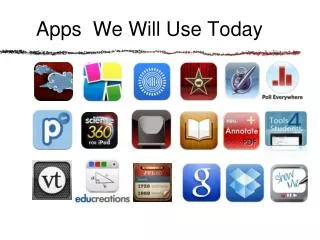
Other Great Apps Science 360 Poll Everywhere ThisDay Socrative ShowMe Voice Recorder
Other Great Apps Pages iMovie neu.Annotate iBooks Google Docs Dropbox
Brenda Fischer, Ed.D. College of St. Scholastica bfischer1@css.edu